





AutoMod Free
Stops spam, invite links, banned words and mention raids automatically.
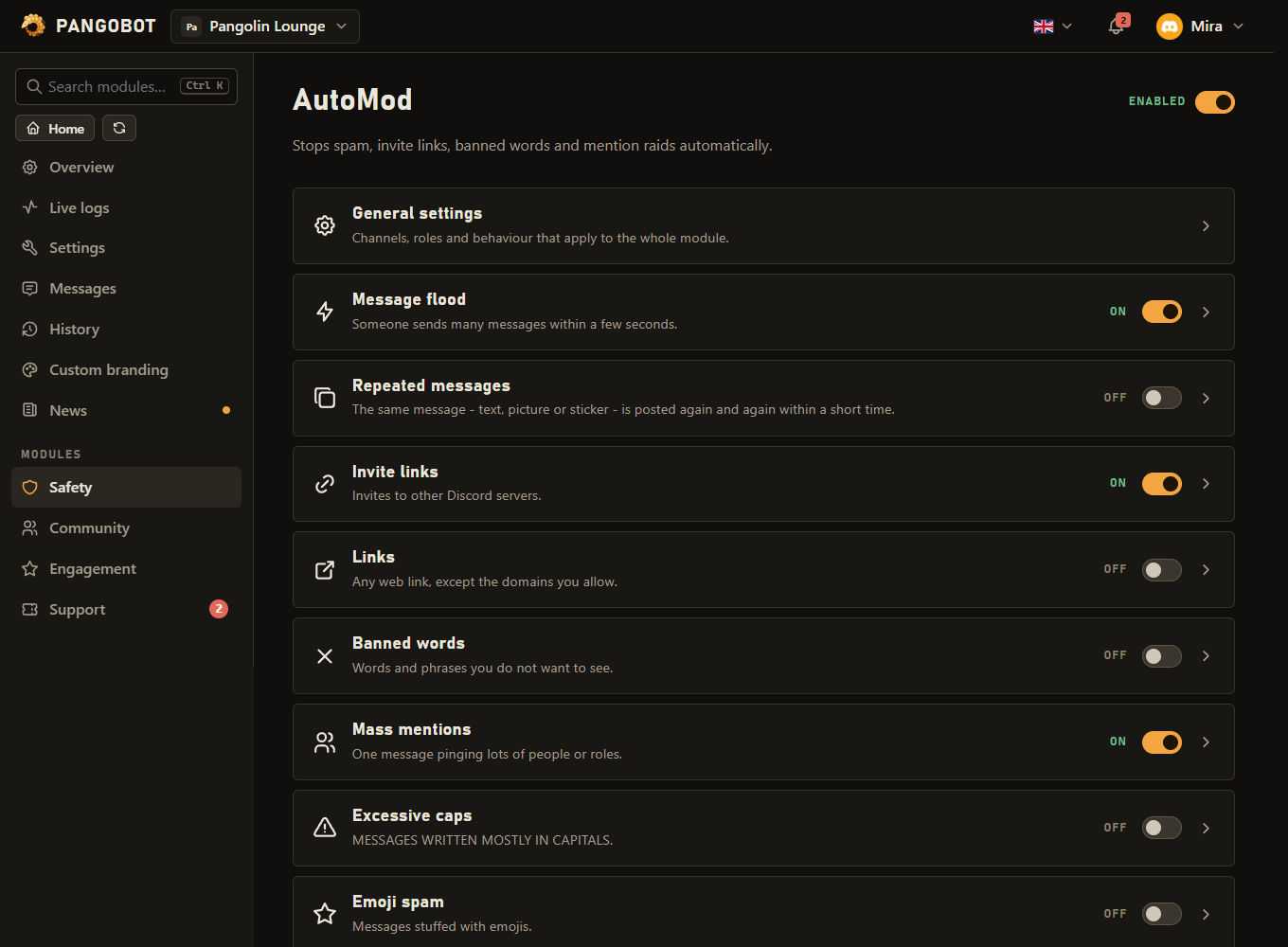
Filters that act by themselves: message floods, repeated messages, invite links, other links, banned words, mass mentions, capitals and emoji spam. Each filter has its own switch and its own action, so harmless things can just be deleted while invite spam leads to a timeout.
Setting it up
- Set an AutoMod log channel so your staff sees what was removed and why. It shows the message as it was typed - formatting and masked links are not drawn - and it only quotes messages from channels the member who picked the log channel can see; for other channels the entry says the text is not quoted there.
- Switch on the filters you want, one by one, and choose the action for each.
- Add ignored roles and ignored channels (a spam or bot channel, for example).
Settings
Everything you can set for this module in the dashboard, in the order the page shows it.
Used by every filter set to Delete + timeout.
Message flood
Someone sends many messages within a few seconds.
Can be changed only when “Message flood” is on.
Can be changed only when “Message flood” is on.
Delete + warn records a Moderation warning: it counts towards your escalation steps. Delete + timeout uses the Timeout length at the top. Can be changed only when “Message flood” is on.
Repeated messages
The same message - text, picture or sticker - is posted again and again within a short time.
Can be changed only when “Repeated messages” is on.
Can be changed only when “Repeated messages” is on.
Delete + warn records a Moderation warning: it counts towards your escalation steps. Delete + timeout uses the Timeout length at the top. Can be changed only when “Repeated messages” is on.
Invite links
Invites to other Discord servers.
e.g. your own vanity code - a pasted invite link works too Can be changed only when “Invite links” is on.
Delete + warn records a Moderation warning: it counts towards your escalation steps. Delete + timeout uses the Timeout length at the top. Can be changed only when “Invite links” is on.
Links
Any web link, except the domains you allow.
Just the domain, e.g. youtube.com - subdomains are included, and a pasted link is cut down to its domain Can be changed only when “Links” is on.
Delete + warn records a Moderation warning: it counts towards your escalation steps. Delete + timeout uses the Timeout length at the top. Can be changed only when “Links” is on.
Banned words
Words and phrases you do not want to see.
Whole-word match. Use * at the start or end as a wildcard: bad* matches "badly". A ? inside a word stands for exactly one letter: b?d matches "bad" and "bed". Can be changed only when “Banned words” is on.
Delete + warn records a Moderation warning: it counts towards your escalation steps. Delete + timeout uses the Timeout length at the top. Can be changed only when “Banned words” is on.
Mass mentions
One message pinging lots of people or roles.
Can be changed only when “Mass mentions” is on.
Delete + warn records a Moderation warning: it counts towards your escalation steps. Delete + timeout uses the Timeout length at the top. Can be changed only when “Mass mentions” is on.
Excessive caps
MESSAGES WRITTEN MOSTLY IN CAPITALS.
Can be changed only when “Excessive caps” is on.
Delete + warn records a Moderation warning: it counts towards your escalation steps. Delete + timeout uses the Timeout length at the top. Can be changed only when “Excessive caps” is on.
Emoji spam
Messages stuffed with emojis.
Can be changed only when “Emoji spam” is on.
Delete + warn records a Moderation warning: it counts towards your escalation steps. Delete + timeout uses the Timeout length at the top. Can be changed only when “Emoji spam” is on.
Limits
- Allowed invite codes: up to 20
- Allowed domains: up to 100
- Words or phrases: up to 300
Good to know
- By default members who can Manage Messages in the channel are ignored - server-wide or through the channel's own permissions - so your moderators are not filtered.
- Filters check messages that are sent, or really edited, after they are switched on. Pinning an older message, starting a thread on it or an embed loading is no edit: older messages stay (use
/purgeto clean up). - Delete + warn records a Moderation warning: it counts towards your escalation steps and expiry, and the member gets Moderation's direct message. With Moderation switched off it is only recorded. Delete + timeout uses the Timeout length at the top of the page and is told by direct message like
/timeoutwhen Moderation sends them. AutoMod uses its own exceptions (its ignored roles and Manage Messages), not Moderation's immune roles, and never shortens a longer timeout that is already running. - Setting a filter to Delete + warn or Delete + timeout - or making such a filter catch more, giving it a longer timeout, taking away exceptions, or switching AutoMod on while such a filter is set - takes Timeout Members yourself (the owner may do anything). Filters that only delete can be changed by anyone who may edit AutoMod.
- When Pangobot cannot delete a message (it lacks Manage Messages in that channel), the log says so, the member is not told off under it and Recent problems on the dashboard names the channel. When a timeout or an escalation step is not carried out, the log says why.
- Message flood counts every message, pictures and stickers included. Repeated messages counts the same text, picture or sticker within the time you set (30 seconds by default). When the limit is reached, every copy is removed, in all channels, and the action is taken once.
- Banned words match whole words. Use
*at the start or end as a wildcard:bad*also matches "badly". A?inside a word stands for exactly one letter:b?dmatches "bad" and "bed". A*inside a word is ignored, so a list typed censored (p*ss) does not catch ordinary words. - The words of a banned phrase are also found when extra spaces, a line break or signs stand between them:
free nitrocatches "free nitro" and "free.nitro". - Allowed domains include their subdomains:
youtube.comcoverswww.youtube.comandmusic.youtube.com. A pasted link is saved as just its domain, and an entry that is no whole domain (such ascom) is refused. - Banned words are also found when they are disguised: look-alike letters from other alphabets, accents, digits for letters (
b4d), spaced-out letters, stretched letters and Discord formatting in the middle of a word. - Forwarded messages and polls are checked like any other message, and so is a message that is edited later.
- Thread and forum post titles are checked against the invite, link and banned-word filters: a new thread whose title breaks one is deleted (a forum post with its first message), and a rename is changed back. Excessive caps and Emoji spam apply to messages only. Who renamed a thread is read from the audit log (View Audit Log): only that member is punished, and a moderator's rename is left alone. Without it the title is still changed back, but nobody is punished.
- Put your own invite code (or vanity code) on the allow list of the invite filter - a pasted invite link is saved as its code. Codes are compared without upper and lower case. Invite shorteners (such as dsc.gg) are always treated as invites.
- Excessive caps only checks messages with at least 12 letters, and the names of custom emoji, mentions and links do not count. Emoji spam counts what is drawn: a flag or a keycap is one emoji, and so is a family or a skin tone.
- With Tell the member why a short notice in the channel pings the member, names the rule and disappears after 6 seconds - at most one every 8 seconds, whatever the action. It is not a direct message.
- Bots and webhooks are never checked - also not PluralKit and similar proxies, whose messages come from a webhook. Links to Discord itself (discord.com, discord.gg, its file links) never count for the link filter; invites are the invite filter's job.
- Apps a member adds to their own account (Use External Apps) post in that member's name: what they post is checked as that member's message. When another member presses a button on such an app's message or fills in its form, the app's answer is still removed if it breaks a rule, but nobody is warned or timed out: either of them may have written it. Apps the server installed count as bots. To stop such apps posting publicly at all, deny Use External Apps for @everyone.
- Discord's own AutoMod (Server Settings > AutoMod) runs first: what it blocks never reaches Pangobot, and its hits are logged by Logging, not here. Both can run side by side; keep word and invite lists in Pangobot's AutoMod if pet names, AFK notes, summaries and search should respect them too.
What the bot needs
- Manage Messages to delete, Timeout Members for timeouts, Kick Members or Ban Members where a warning escalates to one. Manage Threads to delete a thread or change its title back, View Audit Log to know who renamed a thread. Send Messages and Embed Links where the notice and the log go.