




Welcome & Goodbye Free
Greets new members, says goodbye and thanks boosters - with your own embeds and picture cards.
Greets new members, says goodbye and thanks boosters - each in a channel of your choice and in your own words, built in the embed builder. A private welcome message by DM is possible too.
Setting it up
- Open the section you want (welcome, goodbye, boost), pick a channel and write the message.
- Use placeholders:
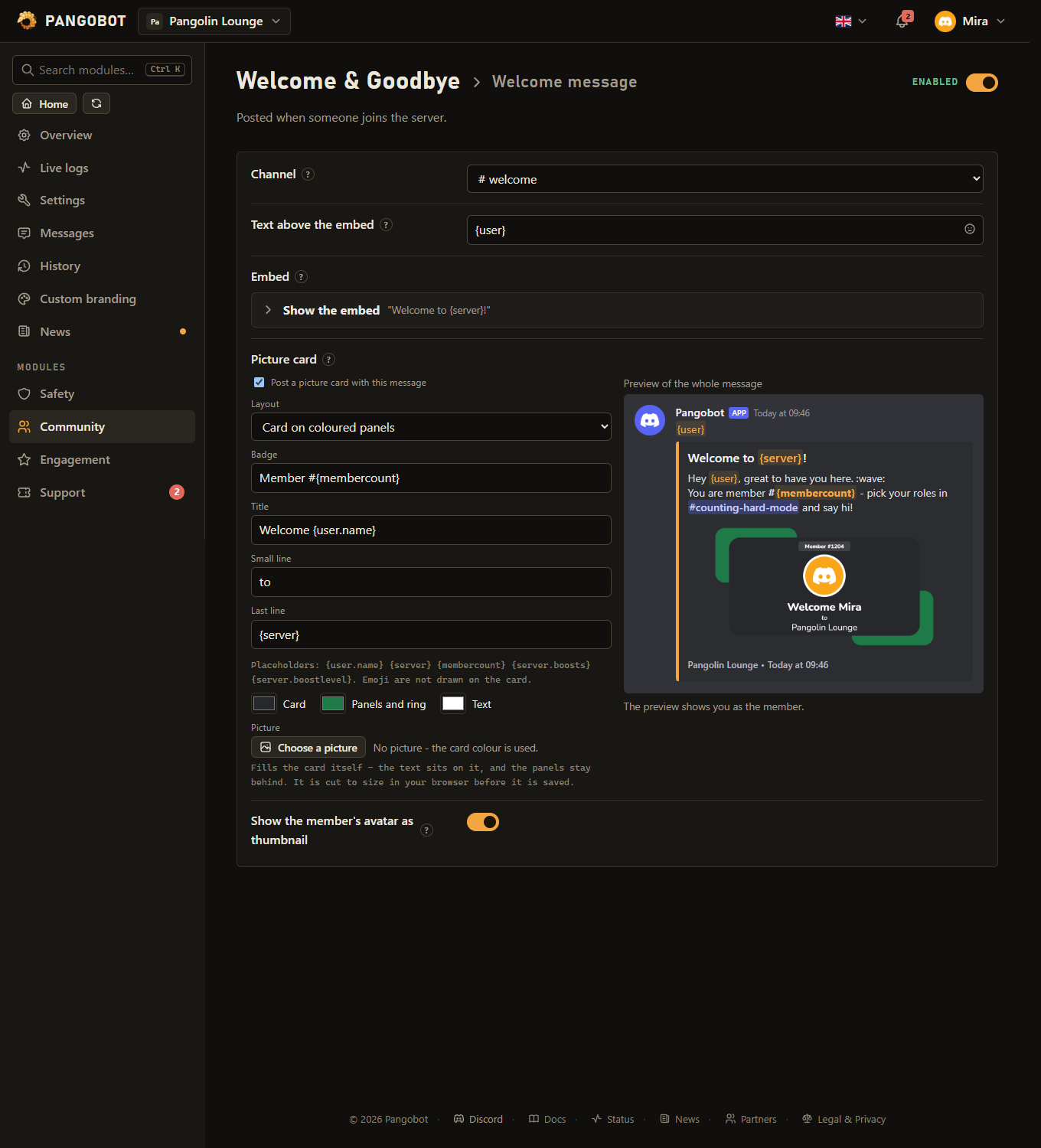
{user}mentions the member,{user.name}does not ping,{server},{membercount}, and for boosts{server.boosts}(how many the server has) and{server.boostlevel}(0 to 3). - Optional: a picture card - the member's avatar in a ring, a badge like "Member #4044" and three lines such as "Welcome Flummi / to / Eurofurence". Pick a layout and colours, watch the card on the right, and switch it on.
- Save and enable the module. An empty channel switches that message off.
Settings
Everything you can set for this module in the dashboard, in the order the page shows it.
Welcome message
Posted when someone joins the server.
Pick one and the message, embed and picture card to write appear. Empty switches this message off.
Placeholders: {user} {user.name} {server} {membercount} {server.boosts} {server.boostlevel} Only when “Channel” is set.
Placeholders: {user} {user.name} {server} {membercount} {server.boosts} {server.boostlevel} Only when “Channel” is set.
A picture Pangobot draws for each member: their avatar, a badge and three lines of text. Placeholders: {user} {user.name} {server} {membercount} {server.boosts} {server.boostlevel} Only when “Channel” is set.
Not with a picture card (the card shows the avatar already), and not when the embed has a small picture of its own. Only when “Channel” is set.
Goodbye message
Posted when someone leaves.
Pick one and the message, embed and picture card to write appear. Empty switches this message off.
Placeholders: {user} {user.name} {server} {membercount} {server.boosts} {server.boostlevel} Only when “Channel” is set.
Placeholders: {user} {user.name} {server} {membercount} {server.boosts} {server.boostlevel} Only when “Channel” is set.
A picture Pangobot draws for each member: their avatar, a badge and three lines of text. Placeholders: {user} {user.name} {server} {membercount} {server.boosts} {server.boostlevel} Only when “Channel” is set.
Not with a picture card (the card shows the avatar already), and not when the embed has a small picture of its own. Only when “Channel” is set.
Boost message
Posted when a member starts boosting.
Pick one and the message, embed and picture card to write appear. Empty switches this message off.
Placeholders: {user} {user.name} {server} {membercount} {server.boosts} {server.boostlevel} Only when “Channel” is set.
Placeholders: {user} {user.name} {server} {membercount} {server.boosts} {server.boostlevel} Only when “Channel” is set.
A picture Pangobot draws for each member: their avatar, a badge and three lines of text. Placeholders: {user} {user.name} {server} {membercount} {server.boosts} {server.boostlevel} Only when “Channel” is set.
Not with a picture card (the card shows the avatar already), and not when the embed has a small picture of its own. Only when “Channel” is set.
Direct message
A private message sent to every new member.
Empty text and no embed: no DM is sent. Placeholders: {user} {user.name} {server} {membercount} {server.boosts} {server.boostlevel}
Placeholders: {user} {user.name} {server} {membercount} {server.boosts} {server.boostlevel}
Limits
- Up to 20 picture cards a minute per server; in a busier moment the greeting goes out without its card.
- Up to 30 greetings a minute per server; beyond that the channel stays quiet for the rest of the minute.
- A member who leaves and comes back is greeted again, and waved goodbye again, after 10 minutes at the earliest.
Good to know
- Only the greeted member is pinged - never a role or @everyone, whatever the text says.
- The member's avatar can be shown as the embed's thumbnail - or on a picture card, which Pangobot draws for each member and shows as the embed's big picture (or on its own, without an embed). The preview in the dashboard is drawn by the same code, with you as the member.
- Picture card layouts: a card on two coloured panels, a plain card, or a picture as the whole background. Every layout can take your own picture: with the panels or the plain card it fills the card itself and the text sits on it; with the background layout it fills everything behind the card. It is cut to size in your browser before it is saved (PNG, JPEG, WebP or GIF, at most 300 KB). Darken the picture (0-80 %, 35 by default) keeps white text readable on a bright or busy picture, and text on a picture gets a soft shadow. Latin, Cyrillic and Vietnamese letters are drawn on the card; emoji and other scripts (Chinese, Japanese, Korean, Greek, Arabic ...) are left out - a name made only of them shows the username instead. On a Japanese server the card's default words stay English for that reason.
- A server gets up to 20 picture cards a minute; in a busier moment the greeting goes out without the card. A greeting of the card alone then goes out as a short embed with the card's words.
- At most 30 greetings a minute per server, and a member who leaves and comes back is greeted again (and waved goodbye again) after 10 minutes at the earliest.
- Members Join Guard removes on joining (a blocked name, an account too new) are neither welcomed nor sent the DM, and members Join Guard or Verification remove get no goodbye.
- The avatar thumbnail never replaces a small picture your embed has of its own.
- Saving checks that Pangobot can post in the channel you picked: if it cannot, the save says which permission is missing. If one is taken away later, the greeting goes out without what it cannot post (the card without Attach Files, the embed as text without Embed Links) and Recent problems says so.
- The direct message is built like the others: a text, an embed, or both, with the same placeholders and a preview.
- With a picture card switched on, the preview beside the card shows the whole message as it will be posted: the text, the embed with the card as its big picture - or, with the embed left empty, the card on its own under the text.
- The DM is skipped silently for members who have direct messages closed.
- During a raid - Join Guard's raid mode, or a lockdown of Verification & Anti-Nuke while that module is active - nobody is welcomed or waved goodbye, and no DM goes out.
- A message's text and embed can only be changed by someone who may write in its channel, also when somebody else picked that channel. A picture in it - an embed's big, small, author or footer picture, a link in the text, or the picture card - needs Embed Links or Attach Files there too.
What the bot needs
- Send Messages and Embed Links in the welcome, goodbye and boost channels, Attach Files for the picture card.