




Giveaways Premium · €3.99
Button-entry giveaways with fair draws, rerolls and role requirements.
Giveaways with a button to enter, a fair random draw, several winners, rerolls, and conditions: a required role and a minimum account age to keep alt accounts out.
Commands
<required> [optional] - "who may use it" is Discord's default; a server's admins can change it per command under Server Settings > Integrations.
/giveaway
Manage Server/giveaway start <prize> <duration> [winners] [channel] [ping_role]Start a giveaway
prizetextWhat can be wondurationtexte.g. 1h, 3d, 1wwinnerswhole number, optionalNumber of winnerschannelchannel, optionalDefaults to this channelping_roletext, optionalRole to ping for this giveaway: its ID or @mention (instead of the usual one)
/giveaway end <id>End a giveaway now
idwhole numberWhich giveaway (pick it, or type its ID from the footer)
/giveaway reroll <id> [count]Draw new winners
idwhole numberWhich giveaway (pick it, or type its ID)countwhole number, optionalHow many new winners (default: as many as the giveaway has)
/giveaway listShow running giveaways
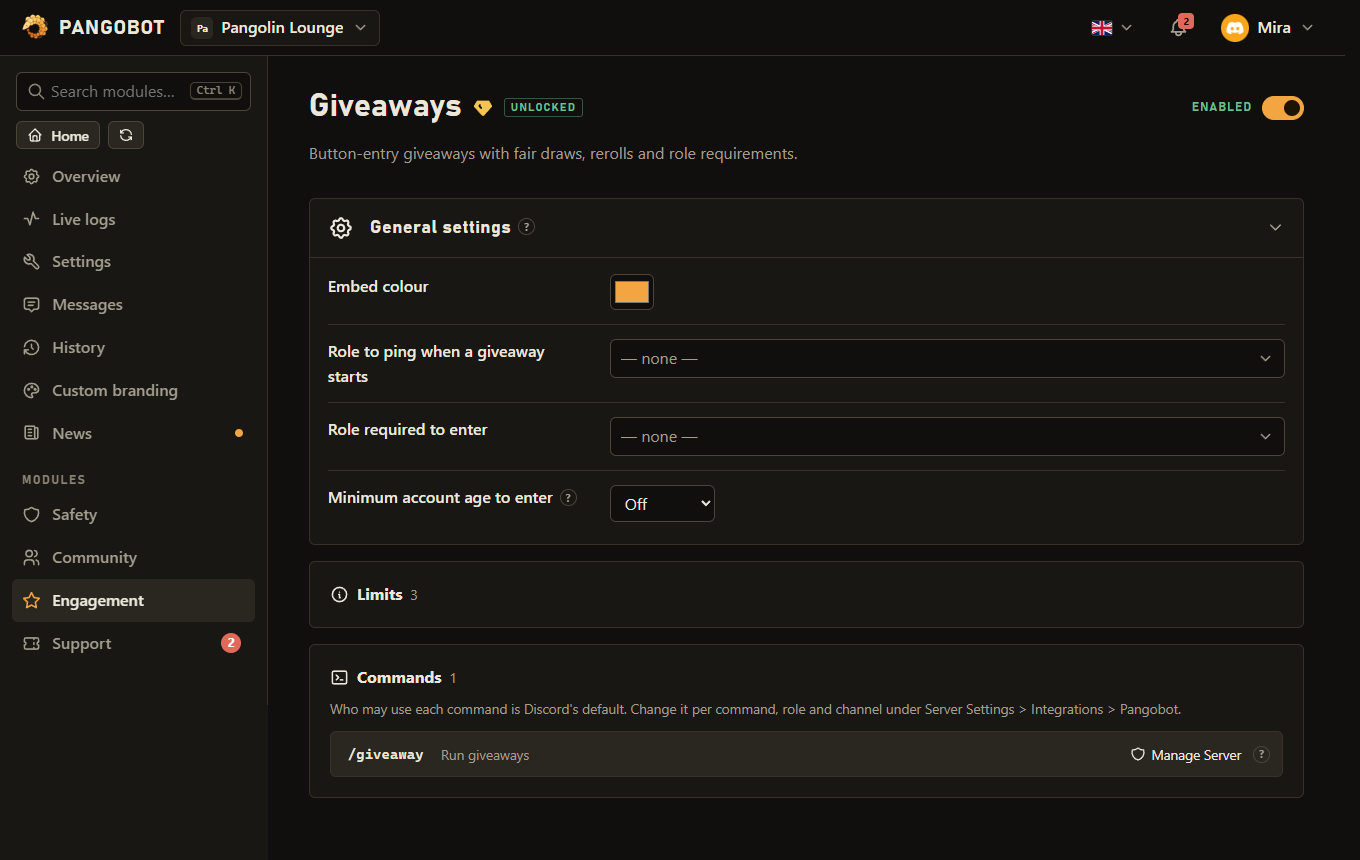
Settings
Everything you can set for this module in the dashboard, in the order the page shows it.
Pinged at most once every 10 minutes. A role that is not mentionable is only pinged if Pangobot has "Mention @everyone, @here and All Roles".
Checked again when the winners are drawn.
Keeps alt accounts out.
Counted from the last time the member joined.
Limits
- A giveaway runs from 30 seconds to 60 days, with up to 20 winners.
- Up to 20 giveaways can run at the same time on a server; ended ones do not count.
- A giveaway can be rerolled 10 times.
- The role to ping is pinged once per 10 minutes per server, however many giveaways start.
- An ended giveaway is deleted with its entries 90 days after it ended.
Good to know
/giveaway startneeds Manage Server by default; change that under Server Settings > Integrations if your event team should run them.- Durations are written like
1h,3d,1w- from 30 seconds up to 60 days. /giveaway endends one early and tells you who won./giveaway rerolldraws new winners among the same entries - never somebody who has already won - up to 10 rerolls per giveaway; itscountoption redraws only some of them. The new winners are posted as an answer to the giveaway. After a full reroll its post shows the new winners; after one withcountit keeps the winners it named and counts the reroll. When nobody is left to draw, nothing is posted.- An ended giveaway keeps a Reroll button under its post (unless nobody entered). Everybody sees it, but only the host and members with Manage Server can use it, with the same rules and the same 10 rerolls as
/giveaway reroll. A host the server takes/giveawayaway from under Integrations loses the button too. - When
/giveawayis opened to an event team, only the host of a giveaway or a member with Manage Server can end or reroll it, and a host can only reroll into a channel they can still see and write in./giveaway listonly shows giveaways in channels the member can see, plus their own; one in a private thread only to its host and to members with Manage Threads. Ending or rerolling works the same way: a giveaway in a channel you cannot see counts as not there, also for Manage Server. - The
channeloption takes a text or announcement channel; without it, the giveaway is posted where the command is used. Both the person starting it and Pangobot must be able to see and write there, and Pangobot also needs Embed Links and Read Message History (to close the giveaway when it ends). - The host cannot enter their own giveaway, and accounts that Discord has flagged as likely spammers cannot enter either. Pressing Enter a second time does not take anybody out: it offers a Leave the giveaway button instead. Somebody who leaves the server (or is banned) is taken out of the giveaways that are still running; if they come back, they can enter again.
- The conditions are checked again when the winners are drawn: somebody who has left the server, was banned, no longer has the required role, is younger than the minimum account age or has been flagged by Discord as a likely spammer since entering is passed over. If you change the required role or the minimum age while a giveaway is running, the new setting counts for its draw too.
- If the role required to enter is deleted, nobody can enter until a manager picks another role (or none) on the dashboard. At the draw, a deleted role no longer counts.
- The ping role is pinged at most once every 10 minutes. Giveaways started in between are posted without the ping.
- The prize is one line of up to 200 characters (line breaks become spaces). In the winner announcement it is plain text: formatting and links written as
[text](address)are shown exactly as typed. - If Pangobot cannot reach your server when a giveaway ends (it was removed and invited back, or your own bot was offline), the giveaway stays open and is drawn as soon as Pangobot is back. This also applies while the module is locked, until it is unlocked again. A giveaway whose end was missed for longer is drawn the next time Pangobot is on the server.
- The giveaway post shows what it takes to enter: the required role, the minimum account age and the minimum time in the server (counted from the last time the member joined). Winners are pinged in the channel, not sent a DM.
- If Pangobot cannot post the winners when a giveaway ends (a permission was taken away, or the channel was deleted), the giveaway still ends and the winners are drawn: Recent problems on the dashboard names them. Once Pangobot can post there again,
/giveaway rerollannounces those winners - it does not draw new ones and uses none of the 10 rerolls. - Without
channel, a giveaway started in a thread runs in that thread; it is still drawn when the thread has archived. If the thread is locked, Pangobot needs Manage Threads to post the winners. - Switching Giveaways off does not cancel running giveaways: they are still drawn at their end time. Nobody can enter or start one while it is off, but
/giveaway end,/giveaway reroll,/giveaway list, the Reroll button and Leave the giveaway keep working. - With your own bot (custom branding), a giveaway posted before a switch can still be entered: the bot that posted it answers its Enter button. When it ends, the bot now in charge posts it again with its winners and removes the old post (that takes Manage Messages; otherwise Recent problems asks you to delete it).
- An ended giveaway can be rerolled for 90 days; after that it is deleted with its entries and winners.
What the bot needs
- View Channel, Send Messages, Embed Links and Read Message History in the giveaway channel; Mention Everyone to ping a role that is not mentionable (the ping role, or one given with
ping_rolein/giveaway start).