




Custom branding
The bot under your own name and picture - on your server only, or as a bot of your own. Free.
Two steps of "make it ours", both free and both under Custom branding in the dashboard's side bar.
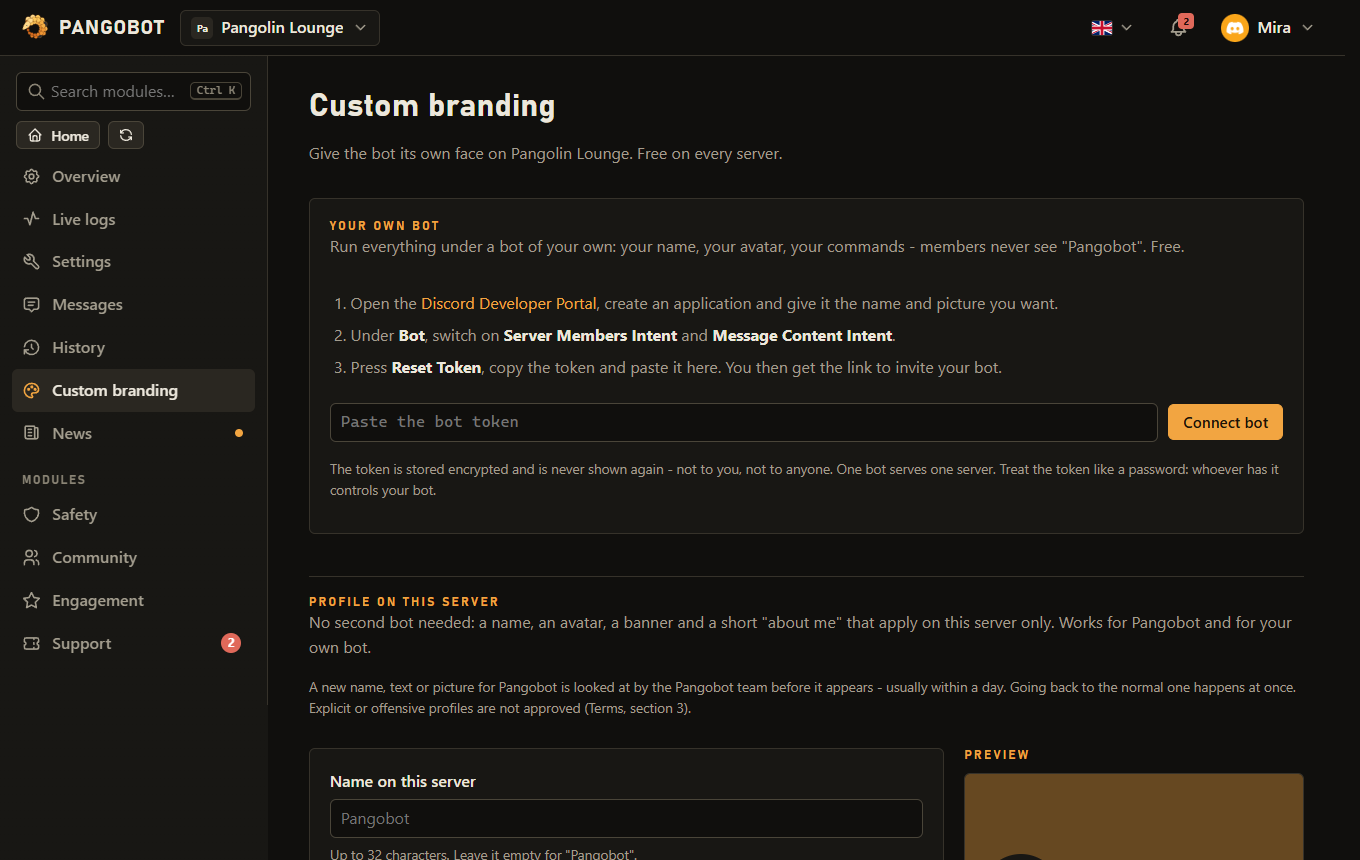
A server profile for the bot
- A name, an avatar, a banner and a short about me that apply on your server only - no second bot needed.
- An embed colour: the coloured bar of every embed the bot posts on your server.
- For the name, the bot's role needs the Change Nickname permission.
- Discord limits how often a bot profile may change. Set everything up, then save once.
A new name, "about me" or picture for Pangobot is looked at by the Pangobot team before it appears - usually within a day; the dashboard shows it as waiting for review until then. Going back to the normal profile and the embed colour take effect at once. Explicit, hateful or impersonating profiles are not approved, and a server that misuses custom branding can lose it (Terms, section 3). Your own bot is not reviewed: it is yours.
A bot of your own
Run everything under your own bot account: your name in the member list, your avatar, your bot's commands - members never see "Pangobot".
- Create an application with a bot in the Discord Developer Portal and switch on the Server Members and Message Content intents.
- Copy the bot's token and paste it under Custom branding > Connect bot.
- Invite your bot with the link the dashboard shows. One bot serves one server.
- Remove Pangobot from the server afterwards - it stays silent while your bot is online, but its slash commands would still be listed next to your bot's.
A ticket (Tickets) is private to the bot that opened it. When your bot comes online while Pangobot is still on the server, Pangobot lets it into its open tickets - so remove Pangobot only after that. Then press Post panel again on each ticket panel, and Post / update on each button or dropdown role menu, so the buttons belong to your bot - the old Pangobot message is removed (reaction role menus keep working as they are). Running giveaways (Giveaways) keep working: the bot that posted one answers its Enter button, and when it ends, your bot posts it again with the winners.
Treat the token like a password: whoever has it controls your bot. It is stored encrypted and is never shown again - not to you, not to anyone. If it ever leaks, reset it in the Developer Portal and save the new one.
- Your bot has 24 hours to come online on your server: invite it with the link the dashboard shows. A bot that never came online within a day (not invited, or its token was reset) gives its place back and its token is removed. Paste a token again whenever you are ready, with no waiting time.
- A bot that was online and then cannot log in for 7 days in a row (deleted, its token reset, or removed from your server) gives its place back too: its token is removed, Pangobot answers on your server as before, and whoever connected it gets a notice in the dashboard.
- One Discord account can run own bots on at most 3 servers.
- While Anti-Nuke (Verification & Anti-Nuke) is on, only the server owner can connect, replace or remove the server's own bot.