





Community
Countdowns Free
Posts a daily countdown to your event, release or birthday - in your own embed.
Counts down to a date - an event, a release, a birthday - with one post per day in your own embed, and a special one when the moment is reached.
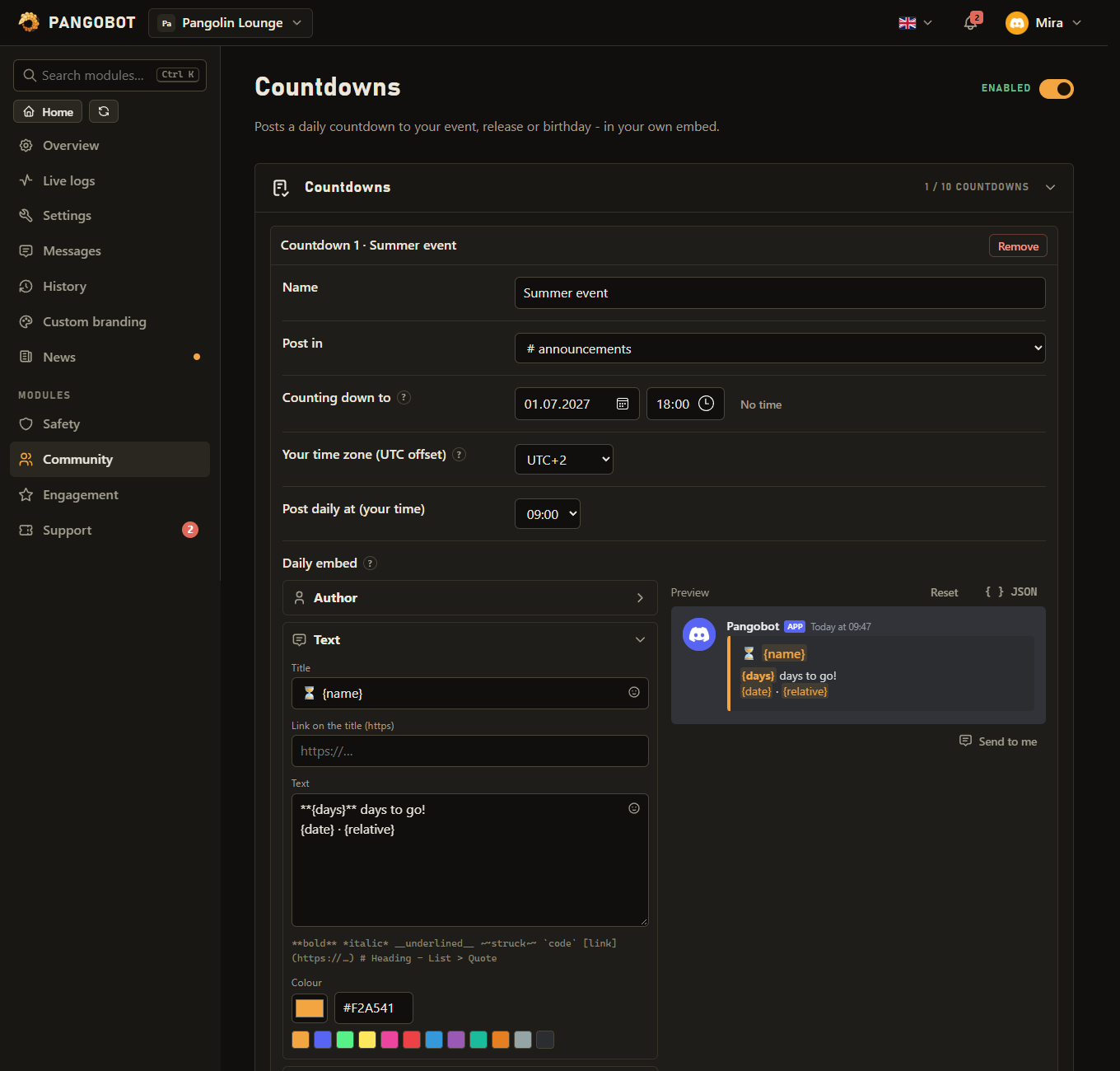
Settings
Everything you can set for this module in the dashboard, in the order the page shows it.
CountdownsListup to 10
NameTextup to 80 charactersrequired“Our event”
Post inChannel
Counting down toDate and timerequired
The day, and a time of day if you like - without one it counts to the start of that day (your time).
Your time zone (UTC offset)UTC offsetUTC−12 to UTC+14UTC+0
e.g. UTC+1 for Berlin in winter, UTC+2 in summer, UTC−5 for New York, UTC+5:30 for India
Post daily at (your time)Hour00:00 to 23:0009:00
Daily embedMessage
Placeholders: {name} {days} {daysText} {hours} {date} {time} {relative}
Embed when the moment is reachedMessage
Placeholders: {name} {days} {daysText} {hours} {date} {time} {relative}
Role to ping when it is reachedRole
Delete yesterday's countdown postSwitchOn
Limits
- Countdowns: up to 10
Good to know
- Placeholders:
{name}{days}{daysText}{hours}{date}{time}{relative}.{days}counts calendar days (0 on the day itself);{daysText}says it in words: "Today", "Tomorrow", "In 5 days". - Set your UTC offset so "daily at 9" means 9 o'clock for you. Half and quarter hours work too:
5.5for India,5.75for Nepal. - The date has to exist: a day like
2026-02-31or a time like18:75is refused when you save. If a countdown saved earlier has such a date, Pangobot does not post it and says so under Recent problems on the dashboard. - A moment that has already passed is refused when you save - a wrong year would announce "the wait is over" at once. A countdown that has already posted can still be edited, and a backup or Put back brings one back as it was, without announcing it again.
- Renaming a countdown or moving it to another channel keeps it the same countdown: it is not posted (or pinged) a second time. Give it a new date and it counts down to that one.
- If Pangobot was offline at the posting hour, that day's post comes as soon as it is back, on the same day. If the final post cannot be sent because Pangobot is missing permissions, it is tried again for a day - fix the permissions and it comes.
- A countdown with no channel, or whose channel was deleted, is not posted: Recent problems on the dashboard says so.
- Yesterday's post can be deleted automatically, so the channel does not fill up.
- You can only pick a channel you may write in yourself.
- A role can only be pinged if everybody may ping it ("Allow anyone to @mention this role" in its settings), or if you may ping every role yourself. @everyone cannot be pinged this way.