




Community
Join Roles Free
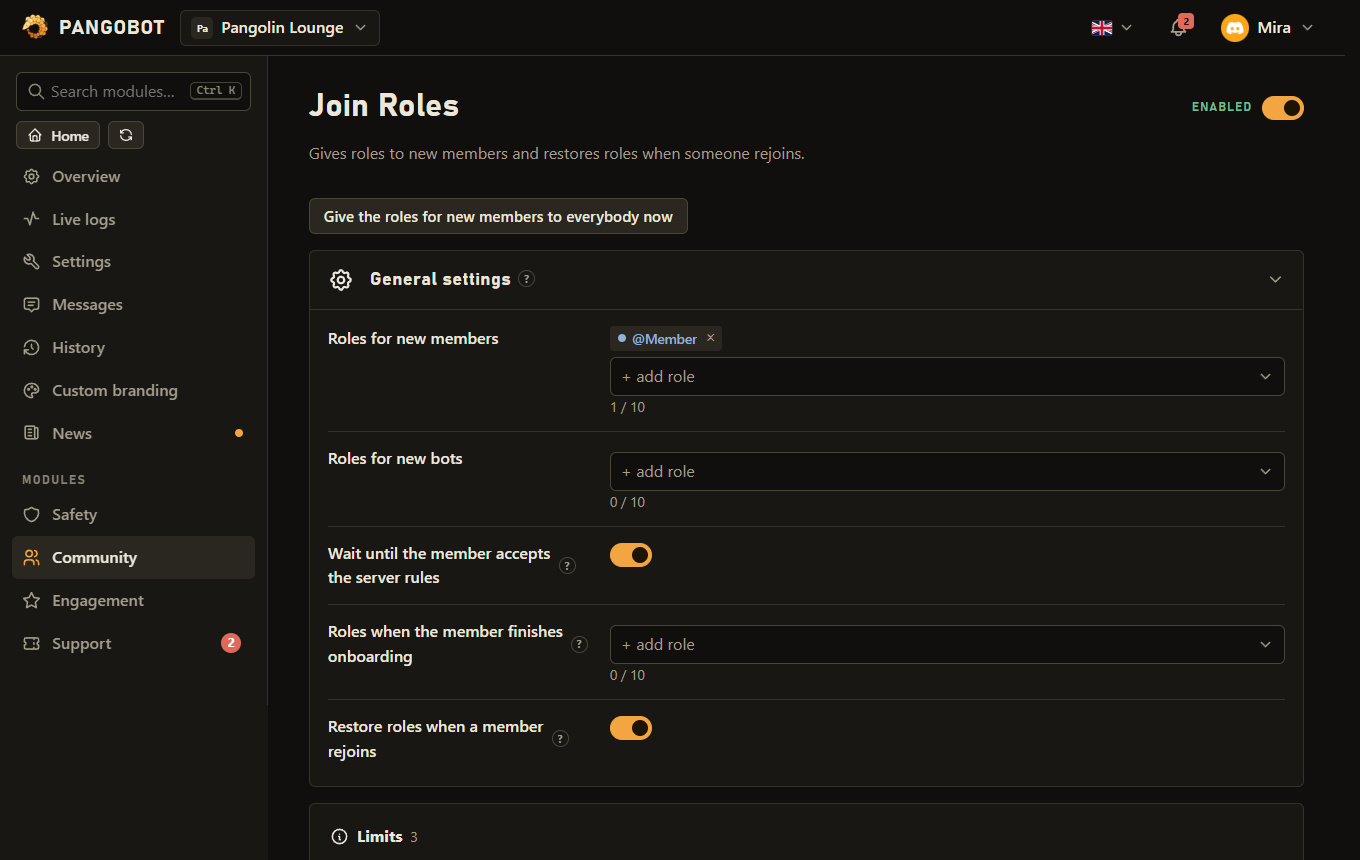
Gives roles to new members and restores roles when someone rejoins.
Gives roles to everybody who joins - separately for people and for bots - and can give returning members the roles they had when they left.
Settings
Everything you can set for this module in the dashboard, in the order the page shows it.
Roles for new membersRoles
Roles for new botsRoles
Staff roles are allowed here, but a bot only gets them when whoever added it could hand them out themselves.
Wait until the member accepts the server rulesSwitchOn
Only applies when Rules Screening is enabled in your server.
Roles when the member finishes onboardingRoles
Given when somebody finishes your Onboarding (Server Settings > Onboarding), the questions Discord asks after the rules.
Restore roles when a member rejoinsSwitchOff
Stops people from shaking off a mute role by leaving and rejoining. Roles are kept for 180 days; switching this off forgets them.
Limits
- Roles for new members: up to 10
- Roles for new bots: up to 10
- Roles when the member finishes onboarding: up to 10
Good to know
- Members who were already here: the button Give the roles for new members to everybody now hands the roles for new members to every member who does not have them yet - after you added a role to the list, or when you start using Join Roles on an existing server. It only adds roles, never removes one, leaves bots out and (with "Wait until the member accepts the server rules" on) members still in the rules screening. It also gives the roles back to members who had one taken away on purpose, so the dashboard asks first. It runs in the background, one member at a time, and can be started once every ten minutes (a press that found nothing to do does not count); members it could not give the roles to show up in the problem list. A role taken off the list, switched to staff permissions or Join Roles switched off stops a running sync. Only somebody who could hand out those roles themselves can press it, and only while Join Roles is on.
- The bot's role must be above every role it should give or take, and it needs Manage Roles.
- Roles with staff permissions (Administrator, Manage Server / Roles / Channels / Messages, Ban, Kick, Timeout and the like) cannot be chosen for new members: Pangobot never hands them to members by itself. A role that gets such a permission later is simply not given out any more.
- Roles for new bots may have staff permissions, but a bot only gets those when whoever added it could have handed out that role themselves (the owner, or Manage Roles with a higher role). Pangobot reads that in the audit log, so it needs View Audit Log; a bot somebody else added gets only the other roles, and the problem list says so.
- Restore roles when a member rejoins stops people from shaking off a mute role by leaving and coming back. It keeps up to 50 roles of each member who leaves while it is on, for 180 days; switching it off forgets them all, and so does a rejoin while it is off. Never restored: staff roles (also those that became one since), roles Discord manages, the verified and unverified roles of Verification (it decides those again) and the birthday role. A saved role that is above Pangobot at the rejoin stays saved for the next time. Members who left before you switched it on have nothing saved, and on servers with more than 25,000 members Pangobot may not know the roles of somebody it has not seen since its last restart. Timeouts in Discord itself survive a rejoin anyway - this is for mute roles.
- Wait until the member accepts the server rules only applies when Rules Screening is on in your server. Restored roles come after the rules screen, too.
- Roles when the member finishes onboarding are given once a member completes your Onboarding (Server Settings > Onboarding). It is separate from the rules screening above, so each can give different roles.
What the bot needs
- Manage Roles.