





AI Help Free
Channel summaries, answers from your own notes, and a second opinion for moderators - on a prepaid balance you size yourself.
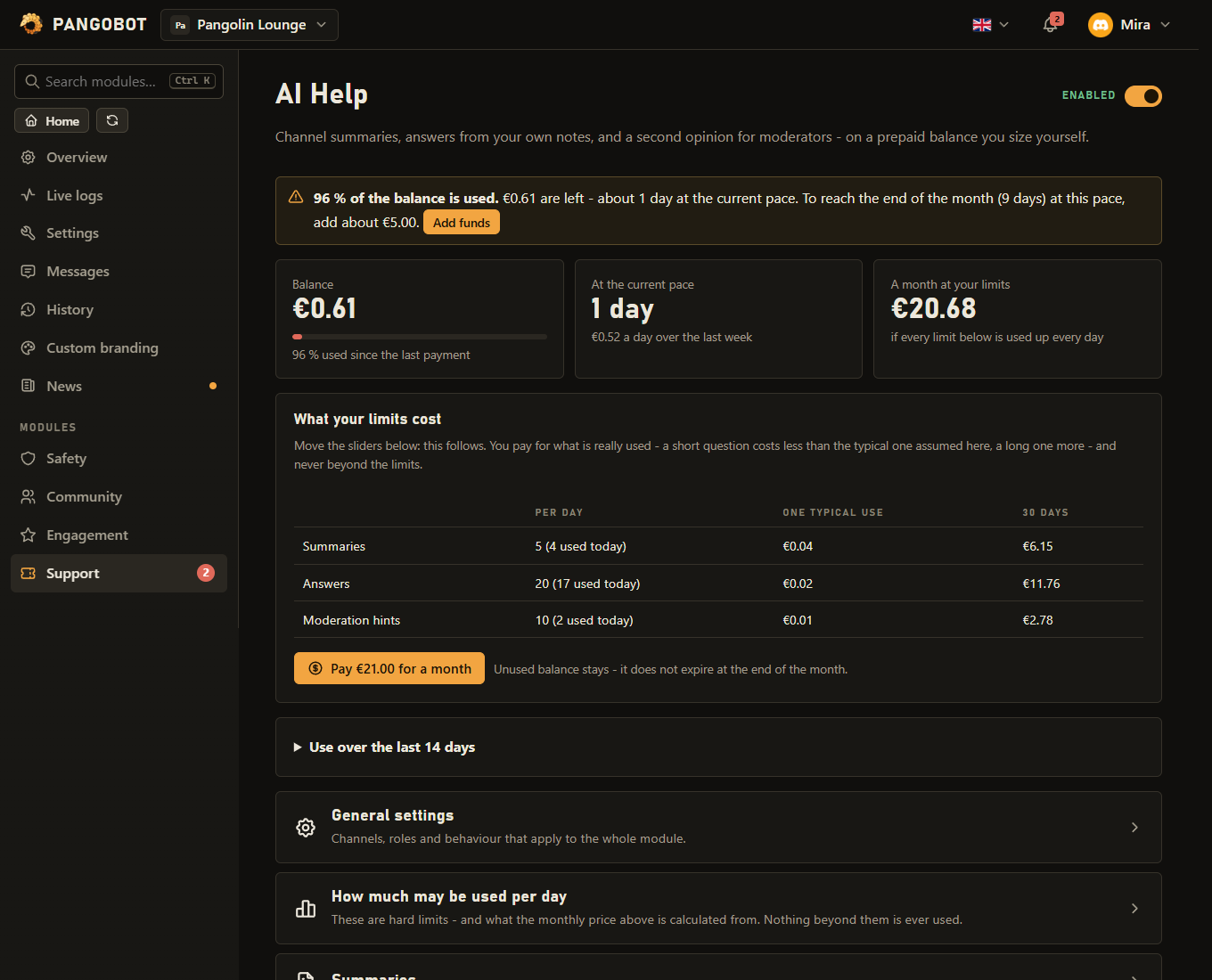
Three helpers powered by an AI model: /summarize sums up what was said in a channel, /ask answers members' questions from notes you wrote (rules, how to get a role, event dates), and a right-click moderation hint gives your moderators a second opinion on a message, based on your rules.
Setting it up
- Top up a balance in the module's page. Every use costs a small amount, shown there per quality level.
- Set the daily limits per feature. They are hard limits.
- Write the notes
/askmay answer from. Without notes there are no answers.
What is sent to Anthropic
- What is sent to the AI service (Anthropic): for
/summarizethe last messages of the channel with the names of their authors, for/askthe question, the server's name and your notes, for a hint the one message, its author's username and your rules. Nothing is sent unless somebody uses a command. - Everything in your notes can end up in an answer to any member who may use
/ask- keep staff-only information out of them. Who may use a command is set under Server Settings > Integrations.
Commands
<required> [optional] - "who may use it" is Discord's default; a server's admins can change it per command under Server Settings > Integrations.
/summarize
Everyone/summarize [messages] [language]A short summary of what was said in this channel
messageswhole number, optionalHow many of the last messages (at most what this server allows)languagetext, optionalLanguage of the summary (default: what this server set) (English · German · Spanish · French · Italian · Polish · Brazilian Portuguese · Turkish · Russian · Japanese · Same as the conversation)
/ask
Everyone/ask <question>Ask a question about this server
questiontextYour question
AI: moderation hint Manage MessagesA right-click command: right-click (or long-press) a message, then Apps > AI: moderation hint.
Settings
Everything you can set for this module in the dashboard, in the order the page shows it.
Better answers cost more per use - the prices are shown above.
/summarize can pick another language for one summary.
Use a staff channel: the notice shows the balance left. Whoever paid last also gets a dashboard notification, even with no channel here.
How much may be used per day
The monthly price above is based on these limits.
Per member and day, at least one use. Members with Manage Server are not limited by it.
Summaries
Answers
Members ask with /ask; the answer comes from these notes only. Without notes there are no answers.
Rules, how to get a role, when events are, who to ask for what ... The longer the notes, the more every answer costs.
Empty = everywhere. Threads and forum posts inside them count too.
Moderation hints
Limits
- Only allow /ask in these channels: up to 20
Good to know
- The module is free; the AI usage is prepaid. When the balance is almost used, Pangobot says so in the channel you pick under Tell us here when the balance is almost used - make it a staff channel: the warning says how much balance is left and about how long it lasts. Whoever paid last also gets a dashboard notification, even with no channel set - as long as they still have Manage Server there; otherwise the newest earlier payer who has, or the owner.
- The balance: when it cannot pay for even the smallest request, members are told so privately at once - nothing appears in the channel. A refund or chargeback of a top-up takes what is left of it from the balance, also what requests running at that moment did not use. While AI Help is switched off for everybody ("not available at the moment"), no balance can be bought; what the server has is kept for when it is back.
- The daily limits also count requests that are still running, so many members asking at the same moment cannot get past them: when the last uses of the day are still being worked on, the next member is asked to try again in a minute. A request the AI service turns down with an error costs nothing and does not count. One that gets no answer in time is counted at its full price, because nobody knows whether it was billed - and so are an empty answer and a refusal.
- One member's share: a member may use at most a part of each daily limit (a quarter by default, at least one use) - so one member, or a few alt accounts, cannot use up the day for everybody. Change it under One member may use at most; members with Manage Server are not limited by it. Uses are counted in memory only and start again at midnight UTC.
- An answer that reached its length limit says cut short under it.
- A moderation hint on a forwarded message assesses the forwarded text. Summaries name people instead of showing mentions, and include forwarded messages, marked as such.
- Language: summaries, answers and hints are written in Pangobot's language on your server (General settings) unless you pick another language in the module (or Same as the conversation).
/summarizehas alanguageoption for one summary. - Longer notes make every answer cost more - keep them to the point. The price per answer (and per hint, with your rules) shown on the page counts them.
/askcan be limited to certain channels. Threads and forum posts inside those channels count too.- Summaries are posted for the whole channel only when the member who asks may write there themselves. In a read-only channel, in a thread they may not write in, in a locked thread without Manage Threads, or during a timeout, only they see it. Refusals and errors are only ever shown to the member who asked.
- A summary can be read by everybody who can see the channel - also by members who may not read its older messages.
- Before a summary is posted, it is checked against your AutoMod rules as if an ordinary member had written it - also when a moderator or a member with an exempt role asks, because a summary is other people's words. A summary that breaks a rule is shown only to the member who asked; in a channel AutoMod leaves alone it is posted as usual. Discord's own AutoMod rules (Server Settings > AutoMod) are not applied to summaries: keep invite and word filters in Pangobot's AutoMod if summaries should respect them.
- Links in summaries and moderation hints always show their full address - text written as a link cannot hide where it goes.
- A moderation hint is advice for a human. It never punishes anybody by itself.
What the bot needs
- Read Message History in the channel for
/summarize.