




Community
Role Menus Free
Self-assignable roles with buttons, dropdowns or emoji reactions.
Self-assignable roles as buttons, a dropdown or emoji reactions under an embed of your own. Up to 15 menus, each in its channel.
Setting it up
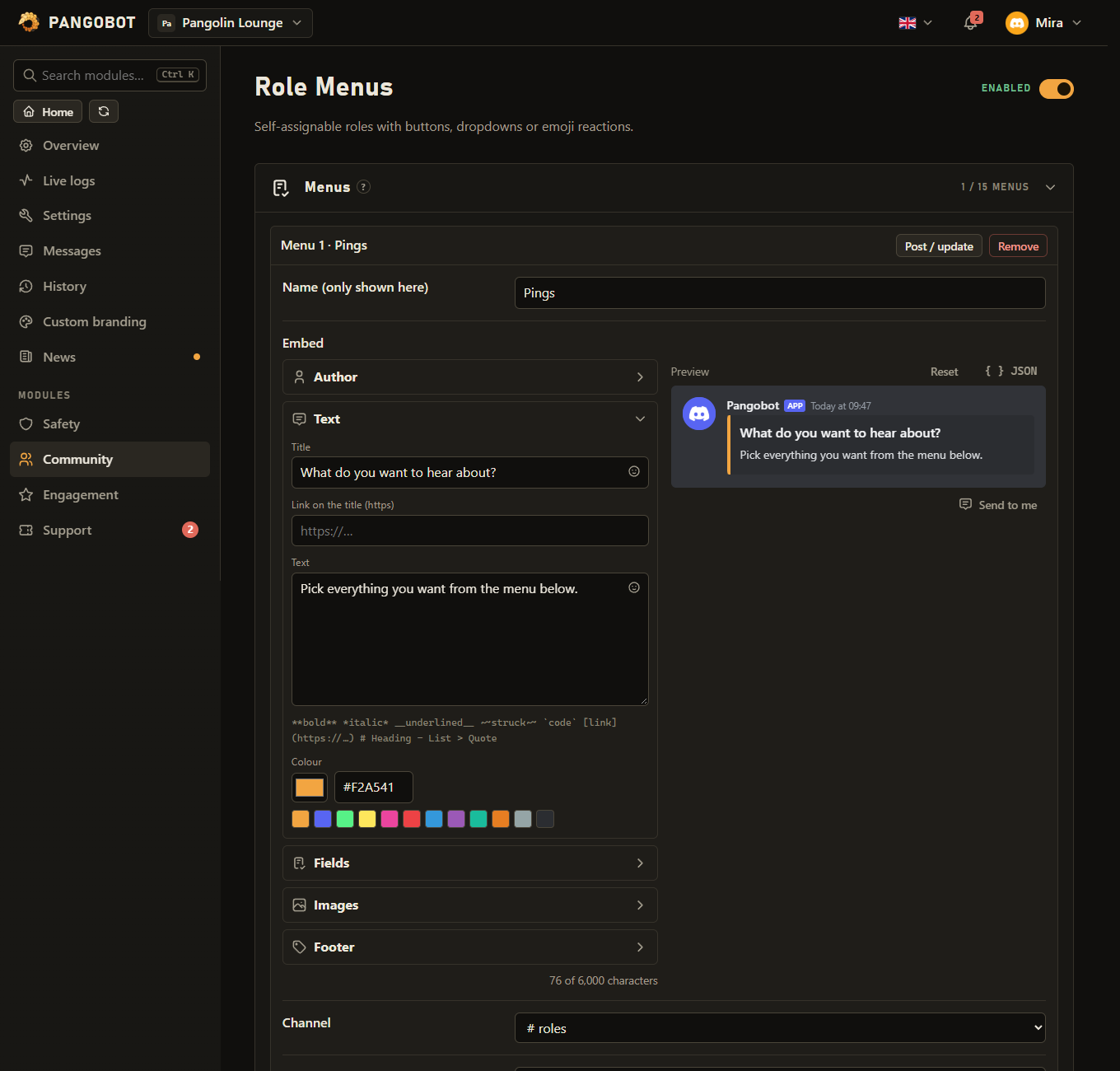
- Add a menu: name, channel, style, the roles, and whether members may hold one or several of them.
- Write the embed.
- Save, then press Post / update on the menu. After every later change, press it again.
Settings
Everything you can set for this module in the dashboard, in the order the page shows it.
MenusListup to 15
Save first, then press "Post / update" on a menu to publish it.
Name (only shown here)Textup to 60 characters“Role menu”
EmbedMessage
ChannelChannel
StyleChoiceButtons
Members may holdChoiceAny number of these roles
RolesRoles
Emojis (only for the style "Emoji reactions")Listup to 20 entries
One per role, in the same order as the roles above: the first emoji gives the first role. Pick them with the smiley button - your server's own emojis are at the top of it. Can be changed only with “Style”: “Emoji reactions”.
Limits
- Menus: up to 15
- Per menu - Roles: up to 20
- Per menu - Emojis: up to 20
Good to know
- The bot's role must be above every role it should give or take, and it needs Manage Roles.
- Roles with staff permissions (Administrator, Manage Server / Roles / Channels / Messages, Ban, Kick, Timeout and the like) cannot be chosen here: Pangobot never hands them to members by itself. A role that gets such a permission later is simply not given out any more - and a member who already has it keeps it.
- Roles Pangobot cannot hand out (deleted, managed by an integration, with staff permissions, above its own role, or used by Verification) are left off the message, and Post / update names them. The role Verification takes away (its "unverified" role) cannot be put in a menu at all.
- For the reaction style, give one emoji per role in the same order as the roles - pick them with the smiley button next to the field, where your server's own emojis come first. The field is greyed out for the other two styles. Which emoji gives which role is fixed when the menu is posted: after re-ordering the emojis or roles, press Post / update so the message and the reactions match again - members keep the roles they already got. A menu switched to the reaction style gives roles by reaction only once it has been posted again. A role deleted in Discord leaves the menu together with its emoji. When a reaction menu is turned into buttons, Pangobot's own reactions go; members' reactions go too if Pangobot has Manage Messages in that channel.
- With "Only one of these roles", picking another role removes the previous one.
- In a dropdown, picking a role you do not have gives it, and picking one you have takes it away - your other roles from the menu stay.
- Buttons and dropdowns on a menu message that is out of date (a newer one was posted, or the menu moved to another channel) answer that it is and hand out nothing. Reactions on an old reaction menu do nothing - delete the old message. A reaction whose role Pangobot cannot give is taken back (with Manage Messages) and shown under Recent problems; reactions cannot answer a member, so use buttons or a dropdown where feedback matters.
- While Role Menus is switched off or Pangobot is offline, reactions do nothing: adding one gives no role and taking one away does not remove it, also not afterwards - the member removes and adds the reaction again.
- Moving a menu to another channel takes its old message away when you save; press Post / update to post it in the new one. After switching to your own bot (Custom branding), press Post / update on every menu: the old Pangobot message is replaced (or, if it cannot be removed, the result says so).
- Adding a role to a menu takes Manage Roles and a highest role above it yourself, also when you copy a role into a menu in another channel or move a menu there (the owner may pick any). A new or changed menu needs Send Messages in its channel yourself, and a new picture in its embed Embed Links.
- The menu's name is only shown in the dashboard: an embed left empty gets the title "Pick your roles".
- Post / update first checks Pangobot's own permissions in the channel - View Channel, Send Messages and Embed Links, for the reaction style also Add Reactions and Read Message History, and Manage Roles - and says which one is missing instead of trying. Its answer names the menu, says whether it was posted or updated, and warns when a single-choice reaction menu lacks Manage Messages. A second click while a menu is being posted is refused, so it is posted once.
- If Discord refuses one of the emojis, the menu stays posted and is remembered: fix the emoji, save, and press Post / update again - the same message is updated, no second copy is posted.
What the bot needs
- Manage Roles, and View Channel, Send Messages, Embed Links and Read Message History where the menu is posted. For the reaction style also Add Reactions, and Manage Messages for single-choice menus (to take back a member's other reaction) and to take back a reaction whose role cannot be given. Use External Emojis for emoji from other servers.