





Logging Free
A paper trail for messages, joins, roles, moderation, invites, voice and server changes - who did what, each in a channel of its own if you like.
A paper trail in channels of your choice: deleted and edited messages, joins and leaves, nickname and role changes, new names and profile pictures, bans and timeouts by anyone, changes to channels, roles, emoji, stickers and the server - each with who did it - and voice activity.
Setting it up
- Create private channels for your staff - one for everything, or one per kind.
- Start with the general log: everything that has no channel of its own goes there.
- Give a kind its own channel whenever you want it apart: messages, joins and leaves, members, roles, moderation, voice, invites, server changes, and what Discord’s own AutoMod did.
What a log channel shows, and to whom
- What a log channel quotes depends on who picked it. Message text, Discord AutoMod hits, messages sent with /sendmessage, who is in a voice channel and the names and topics of channels are quoted in a log channel only if the member who picked that channel on the dashboard can see the channel they come from - the same goes for a member who emptied a more specific log channel, so that the entries fall back to this one. Otherwise the line still says what happened, who did it and where, marked Not quoted here. Channels the server owner picked quote everything. If the member who picked a log channel leaves the server, that channel stops quoting until somebody saves the Logging settings: whoever saves takes it over.
- The dashboard's Live logs show the same events as they happen - the whole entry (a very long one is shortened), but only to those who can see the channel it comes from (a private thread needs Manage Threads; a deleted channel's entries stay visible only to those who could see it). Members whose role was given Logging under Dashboard access can watch them too. Discord AutoMod hits appear under the AutoMod filter, also without a log channel for them; joins, nicknames and roles under Members, bans, kicks and timeouts under Moderation, voice under Voice. When the page opens it shows the last 60 events.
- A log channel that was deleted in Discord is named on the dashboard: the settings say deleted channel, and Recent problems says its logs only reach Live Logs until you pick another one. A log channel Pangobot cannot post in (View Channel and Send Messages with Embed Links, or Manage Webhooks) is refused when you save.
- Logs are posted to Discord, not stored by Pangobot. Deleted messages are shown from what the bot still had in memory.
Settings
Everything you can set for this module in the dashboard, in the order the page shows it.
Log channels
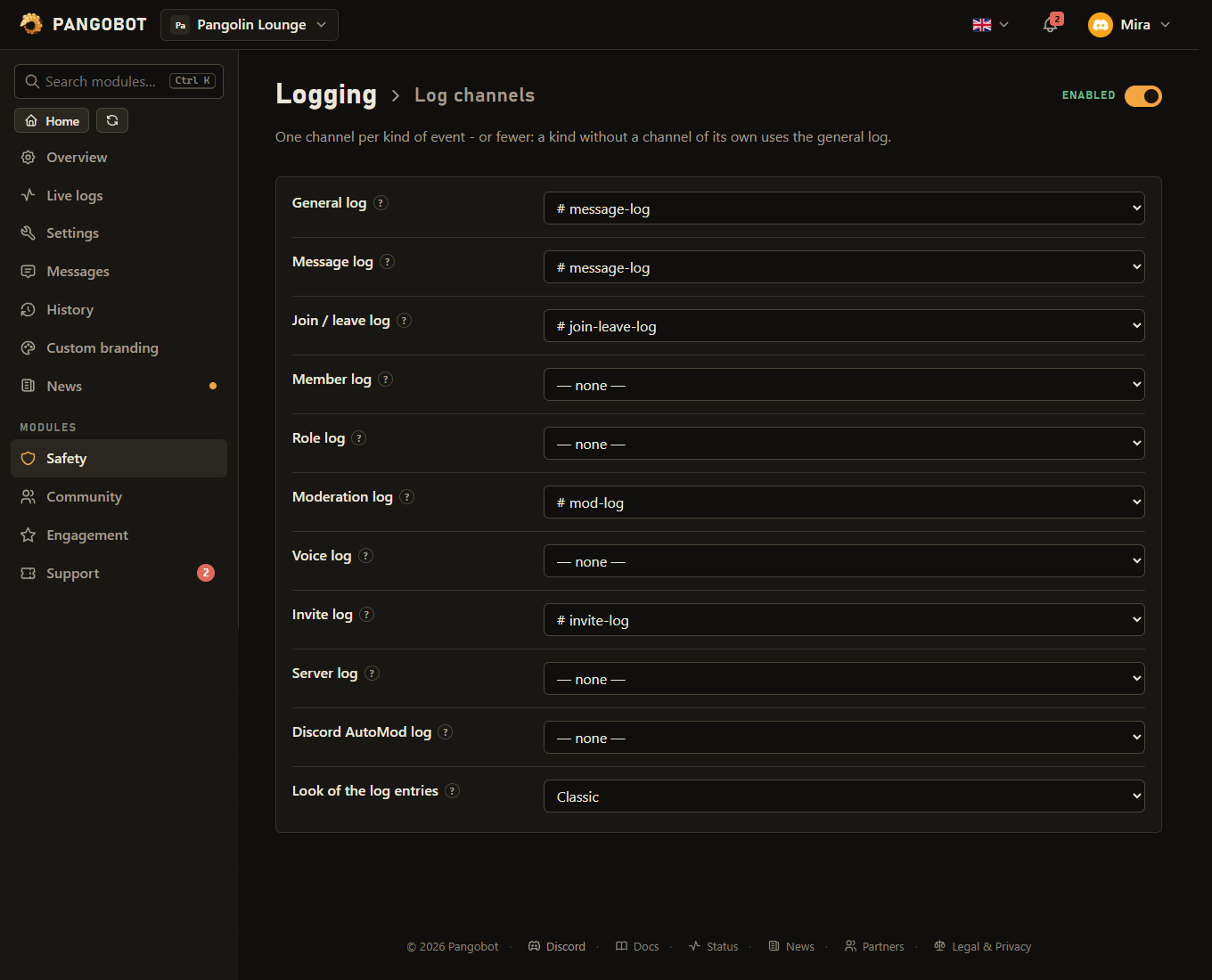
One channel per kind of event - or fewer: a kind without a channel of its own uses the general log.
Everything that has no channel of its own below. Leave it empty and only the kinds with a channel are logged.
Deleted, bulk-deleted (with a transcript) and edited messages - with who deleted them, where Discord says. Pick a channel only your team can see: entries quote deleted and edited messages.
Who joined (with the age of the account) and who left (with the roles they had). Empty = member log.
Nickname changes, new names and profile pictures - and joins, leaves and roles while those have no channel of their own.
Roles given to and taken from members, with who did it (needs View Audit Log), and roles created, changed or deleted. Empty = member log and server log.
Bans, kicks and timeouts by anyone - also by hand in Discord and by other bots (needs View Audit Log). Pangobot's own /ban, /kick and /timeout are a case in Moderation's mod log as well - point the two at different channels to keep them apart.
Voice joins, leaves and moves.
Invites created and deleted. Empty = server log. (Who joined through which invite: module Invite Tracker.)
Channels, emoji, stickers and server settings - each with who changed them.
What Discord's own AutoMod rules blocked or flagged (Server Settings > AutoMod). Needs the Manage Server permission. Pangobot's AutoMod has its log channel in its own module.
Classic: embeds, up to ten entries per message. Cards: a box per entry with its buttons (Jump to message, Get user ID) - fewer entries fit in one message. Also used by the log channels of other modules.
What is left out
Deleted and edited messages of bots are not logged and are left out of bulk-delete transcripts, and so are bots' name and picture changes. Bots joining voice or getting roles are still logged.
Off: the file names and links stay, only the preview is left out.
Deleted and edited messages, bulk deletes, Discord AutoMod hits and voice joins and leaves in these channels are not logged. A category covers every channel in it, and their threads and forum posts. Changes to the channels themselves still go to the server log. Only someone who can see a channel, its private threads included, may take it off the list.
Good to know
- Who did it is read from Discord's audit log, so Pangobot needs View Audit Log for it. Channels, roles, the server, its emoji and its stickers, deleted messages, bulk clears and nicknames all name whoever did it, with the reason where one was given. Without it, the entry says View Audit Log is missing where the name would be.
- Deleted messages: Discord records nothing when members delete their own message, so an entry without a name says the author most likely did it. The text is shown as it was typed - a link shows its real address, and nothing in it can look like a line of the entry. A long message is kept whole, in up to four parts. Pangobot keeps the last 150 messages of a channel for at most two hours: in a busy channel a message deleted a few minutes later can already be gone from its memory.
- Emoji and stickers added, renamed or removed go to the server log, with the picture and with who did it.
- A role Discord manages - a bot's own role, the booster role, an integration's role - is never deleted by hand: it goes when the thing that owns it goes. The entry says which.
- Permission changes are listed one by one: which role or member, which permission, and what it was before ("View Channel (allowed to denied)"). A change inside an existing override counts, not only adding or removing a whole one. An override that vanished together with its role says that too. At most twelve are listed, then a count.
- What somebody was before (old nickname, roles when they left) is known for members Pangobot has seen since it last started. With a member, join/leave or role log, the member list is loaded at startup, on servers up to 25,000 members - on bigger servers a role change or the roles of a leaver can be missing for members Pangobot has not seen since it started.
- How an entry looks: a title, then the facts as short lines (user, channel, reason...), the member's picture on the right and - when somebody did it - that person in the footer. Names are shown as plain text: a nickname or channel name cannot turn into a link or a ping.
- Edited messages show Before and After with what changed underlined: the words that were removed or added, or just the letters when one word was corrected - at most 1024 characters of each (a bulk-delete transcript has the whole text). A file taken out of a message by editing it is logged too, with its name and link. Edits inside the message log channel itself are not logged.
- Look of the log entries: Classic puts up to ten entries into one message; an entry that is alone in its message gets a Jump to message button (an edited message). Cards shows every entry as a box of its own with its buttons - Jump to message and Get user ID, which answers with the ID privately so you can copy it - but fewer entries fit into one message. The style applies to every log channel on the server, also those of other modules. Live Logs on the dashboard keep their own look.
- New names and profile pictures (the ones members set for all of Discord, not the server nickname) go to the member log, with what they were before. After a restart Pangobot reads the member list of servers with a member log once, so it knows the previous name.
- User left says when the member was banned or kicked, and by whom (needs View Audit Log). Invite deleted says who deleted it - an invite that ran out of time or uses is removed by Discord itself. Server updated also covers a new owner, the explicit content filter, 2FA for moderators, the default notifications and the system and rules channels; Role updated also whether the role can be mentioned by everyone, is shown separately and its icon.
- A kind without a channel falls back: joins and roles to the member log, invites and role changes to the server log, and everything to the general log. Without a general log, a kind with no channel is simply not logged.
- The role log names who gave or took a role, and the reason if one was given - from the audit log, so it needs View Audit Log.
- The Discord AutoMod log shows what the rules under Server Settings > AutoMod blocked or flagged. Discord only tells bots with Manage Server about it. Pangobot’s own AutoMod has its log channel in its own settings; so have Tickets, Join Guard and the Invite Tracker (who joined through which invite).
- The moderation log is read from Discord's audit log, so it needs View Audit Log - for every ban, kick, timeout and prune, Pangobot's own included. Without it that channel stays empty (Moderation keeps its own mod log). It also shows what was done without Pangobot - by hand in Discord or by other bots. Pangobot's own /ban, /kick and /timeout are a case in Moderation's mod log as well: point the two at different channels to keep them apart.
- Bot messages are ignored by default (their deleted and edited messages, and their name and picture changes - bots joining voice or getting roles are still logged); channels and whole categories can be excluded. The ignored list covers deleted and edited messages, bulk deletes, Discord AutoMod hits and voice joins and leaves: an ignored channel covers its threads, an ignored category every channel in it and their threads and forum posts. A move from an ignored voice channel to another one is logged as a join. Changes to the channels themselves still go to the server log. A channel on the list can only be taken off it by someone who can see it - for a category, every channel in it.
- Files of a deleted message are listed by name, and every name is a link to the copy Discord itself holds. If one of them is a picture, the log shows it. Discord takes the files of a deleted message away after a while, so the link and the picture work for as long as Discord still has them - Pangobot keeps no copy. Show the picture of a deleted message in the log switches the preview off and leaves the names and links. A file name is shown as plain text, so it cannot turn into a link of its own.
- Members with Manage Messages in a log channel can delete its entries, and with Manage Webhooks they can see Pangobot's webhook there: give these only to people you trust with the log. Single deletions and edits inside a log channel are not logged; a purge of it is. Log lines go out under your bot's name on this server and its picture.
- Bulk deletes (a purge, a ban that deletes messages, another bot clearing a channel) come with a transcript: a text file of every deleted message Pangobot still had in memory, oldest first, with author, time, text and file links. Messages older than about two hours, or from before a restart, are listed by ID only. Bot messages are left out while bot messages are ignored. The transcript goes only to a log channel whose picker can see the cleared channel, and Pangobot needs Attach Files there unless it posts through its webhook.
What the bot needs
- View Audit Log (who did it); in the log channels Send Messages and Embed Links, Attach Files for bulk-delete transcripts, and Manage Webhooks if you like (faster delivery). The Discord AutoMod log needs Manage Server: Discord only sends those events to bots that have it.