





Temp Voice Premium · €3.99
Join a hub channel and get your own voice room that cleans itself up.
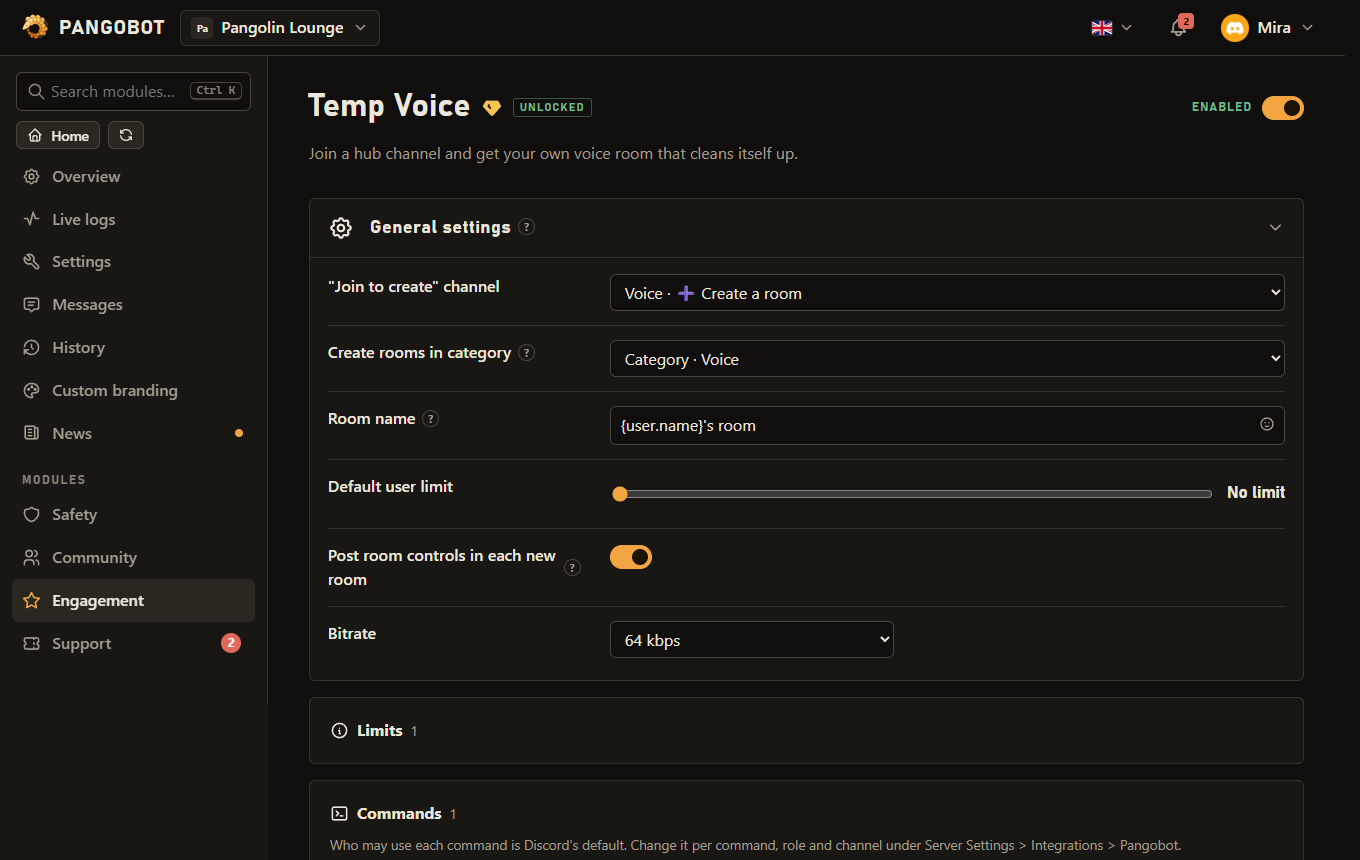
Members join a "Join to create" channel and get a voice room of their own, which they control with the room controls in the room's chat or with /voice. The room is deleted when the last person leaves.
Setting it up
- Create a voice channel to serve as the hub and pick it as the "Join to create" channel.
- Optional: a category for the rooms, the name pattern (
{user.name}), a default user limit and the bitrate.
Commands
<required> [optional] - "who may use it" is Discord's default; a server's admins can change it per command under Server Settings > Integrations.
/voice
Everyone/voice name <name>Rename your room
nametextNew name
/voice limit <users>Set the user limit
userswhole number0 = unlimited
/voice lockStop new people from joining
/voice unlockUndo the lock - open the room again
/voice kick <user>Remove someone from your room and keep them out
usermemberWho
/voice permit <user>Let one member into your room, even when it is locked
usermemberWho
/voice panelPost the room controls in the room chat again
Settings
Everything you can set for this module in the dashboard, in the order the page shows it.
Empty = same category as the hub channel.
Placeholder: {user.name}
Buttons in the room's own chat to rename it, lock it, remove someone and set the user limit. Only the owner can use them.
Limits
- A member can create 2 rooms per 30 seconds, a server 20 rooms a minute.
Good to know
- Room controls: every new room gets a message in its own chat with buttons to rename it, lock or unlock it and remove someone, plus a menu for the user limit. Everybody in the room sees it, but only the owner can use it, and only while they are in the room. Changes made with
/voiceshow on it too, and/voice panelposts it again if it was deleted. Switch it off with "Post room controls in each new room";/voicekeeps working either way. Pangobot needs Send Messages and Embed Links in the rooms' category to post it. - The owner of a room can rename it, set a limit, lock and unlock it, and kick someone out of it. A member who is kicked (or removed with the panel) cannot rejoin that room until the owner lets them in again with
/voice permit./voice permitalso lets one member into a locked room, but never someone the rooms' category keeps out, or someone a moderator shut out of the room - and a permit ends when a moderator does that later. **/voice kickcannot remove server staff**: nobody with a staff permission such as Move Members, Mute Members, Timeout Members, Kick Members or Manage Messages, on the whole server or only in the voice category. - Discord allows a channel to be renamed twice in ten minutes. Pangobot counts this per room: a third
/voice nameis refused and tells the owner when the next rename is possible, instead of Discord holding it back for minutes. The count survives a restart of Pangobot, and a rename Discord refused does not count. - Who gets a room: only a member who could join the rooms' category by themselves. A member the category keeps out (a members-only category, or a role that takes voice away) stays in the hub, even when the hub is open to them.
- One room per member: a member who still has a room (friends stayed in it) and joins the hub again is moved back into that room instead of getting a second one (that does not count towards the limit of rooms per member). Only joining the hub counts: muting or turning on a camera in the hub makes no extra room. A moderator can keep an owner out of their own room with a Connect deny on them in that room: Pangobot does not move them back in, and
/voice lockorunlockdoes not lift the deny. - Lock takes Connect away from @everyone and from the roles the category lets in (a "Member" or "Verified" role). Staff roles the category explicitly lets in, and administrators, can still join a locked room; other moderators cannot join it, but can still move people out of it or disconnect them. Unlock gives Connect back exactly as the category has it, so a room in a members-only category never opens to everybody. The panel shows a room as locked only when it is locked by the owner, not because its category is members-only.
- At most 20 rooms a minute are made per server, besides the limit of two per member in 30 seconds. Over the server's limit, members stay in the hub and can join it again a moment later; a member over their own limit is disconnected from the hub. A member who gets no room (too fast, the category keeps them out, or the room could not be made) is told why in the hub's chat, in a short message that deletes itself.
- A room with only bots left in it (a music bot on 24/7) counts as empty and is deleted. Rooms that emptied while Temp Voice was switched off, paused or locked are deleted when it runs again - at the latest 10 minutes later, also after a restart of Pangobot.
- The error list on the dashboard says when a room could not be made (the category already holds 50 channels, or Pangobot is missing a permission), when Pangobot could not move a member into their room (it needs Move Members and Connect in the category), when an empty room could not be deleted, and when the "Join to create" channel was deleted. An empty room that could not be deleted is tried again the next time it empties.
- Room names follow AutoMod: a name AutoMod would remove from chat (an invite, a link, a banned word, too many capitals or emojis) is not put in the channel list. A room made from such a nickname is called "Voice room", and
/voice namerefuses the name.
What the bot needs
- Manage Channels, Move Members and Connect in the category, and Manage Permissions there for
/voice lockandunlock(Pangobot keeps its own way into a locked room); Send Messages, Embed Links and Read Message History for the room panel.