



Join Guard Free
Screens new members and reacts to join raids.
Looks at every account that joins: too new, no profile picture, a name from your block list? And it notices join raids - many accounts within seconds - and reacts by itself.
Setting it up
- Choose what happens when a filter matches (for example kick) and write the direct message sent before removal.
- Set the filters: minimum account age, no profile picture, blocked name fragments.
- Switch on raid detection with a threshold that fits your server (for example 10 joins within 10 seconds).
Settings
Everything you can set for this module in the dashboard, in the order the page shows it.
Removals, raid alerts and members Pangobot could not remove are posted here.
Ban needs Ban Members for Pangobot - and for you, unless you own the server. Kick needs Kick Members.
Placeholders: {server} {reason}. Not sent when Pangobot cannot remove the member.
Never removed, reported or counted for a raid. By user ID - or paste a mention. Adding someone needs Kick Members yourself (Ban Members when Join Guard bans). Bots are always let through.
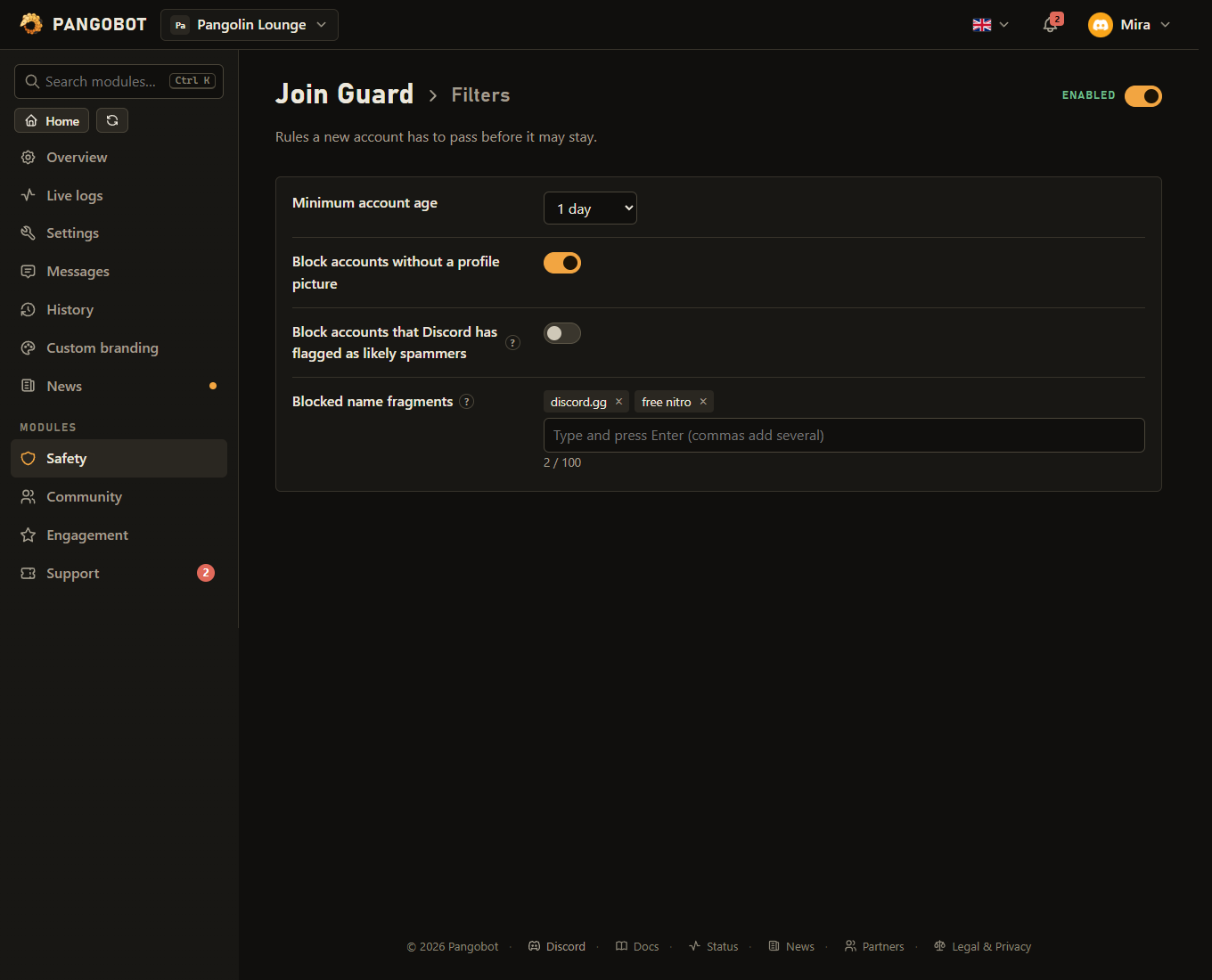
Filters
Rules a new account has to pass before it may stay.
Discord marks accounts it believes are spam bots.
Checked when someone joins and whenever they change their name. Look-alike letters, accents and spacing do not get around it. A fragment is also found inside longer words: "mod" catches "Desmond" - use at least 3 letters (one character is enough in Chinese, Japanese or Korean), whole phrases are safest.
Raid detection
React automatically when many accounts join at once.
Can be changed only when “Raid detection” is on.
Can be changed only when “Raid detection” is on.
Ban needs Ban Members for Pangobot - and for you, unless you own the server. Kick needs Kick Members. Can be changed only when “Raid detection” is on.
Can be changed only when “Raid detection” is on.
Report instead of removing
Accounts that look wrong are posted for your staff, with a Ban and a Dismiss button.
Only your staff should be able to see it. Only when “Report suspicious accounts” is on.
The signs: three or more digits in a row in the name, unusual symbols, a name that mixes alphabets, no profile picture, and a new account - plus each of the three signs below that you switch on. Two of them is a good starting point - one reports a lot of ordinary people. Only when “Report suspicious accounts” is on.
0 = do not count age as one of the signs. Only when “Report suspicious accounts” is on.
Only for servers that use Onboarding (Server Settings > Onboarding). Only when “Report suspicious accounts” is on.
Discord marks somebody who left and came back. Often harmless on its own - worth having next to the other signs. Only when “Report suspicious accounts” is on.
Discord itself has found the name or the "About me" of that account unacceptable. Only when “Report suspicious accounts” is on.
Only your staff should be able to see it. Only when “Report young accounts (by their age alone)” is on.
Only when “Report young accounts (by their age alone)” is on.
Limits
- Always-allowed accounts: up to 100
- Blocked name fragments: up to 100
- At most 10 account reports a minute per server - suspicious and young accounts together.
- Each account is reported at most once every 30 minutes.
Good to know
- Report instead of removing: two channels of your own, for accounts that are worth a look but not worth an automatic kick. Suspicious accounts are the ones with several signs at once - three or more digits in a row in the name, unusual symbols, a name that mixes alphabets (the look-alike trick), no profile picture, and a new account; you set how many signs are enough (two is a good start). Young accounts are reported by their age alone, three months by default. Each card shows the account, its picture, when it was created and why it was flagged, with a Ban and a Dismiss button.
- The Ban button needs Moderation switched on: Moderation does the ban. While Moderation is off, new cards come without a Ban button, and the one on an older card says to ban in Discord itself.
- While a moderator is filling in the Ban dialog, the card is theirs: every button on it greys out for everybody else, and one more button says who is handling it. If they close the dialog without sending it, the buttons come back by themselves after three minutes (Discord does not tell Pangobot when a dialog is closed). A ban that Discord refuses gives the buttons back at once.
- A card is only posted for somebody none of the filters above matched (an account a filter matched but Pangobot could not remove shows up in the log channel as not removed, not as a card), never during raid mode, and at most ten a minute per server, so a wave of joins cannot bury the channel. An account that keeps leaving and coming back is reported once in 30 minutes. An account that is both suspicious and young gets one card, the suspicious one.
- Put known-good accounts on the always-allowed list by their user ID: they are never removed, reported or counted for a raid. Bots are never screened.
- Names are checked again whenever a member changes their username, display name or nickname, and look-alike letters, accents and spacing do not get around the list. Each part of a name is checked on its own, and a fragment is also found inside longer words (
modcatches "Desmond"), so keep fragments specific - at least 3 letters (one character is enough in Chinese, Japanese or Korean, and a symbol on its own works too). A rename only counts for a fragment the new name brought in. A nickname counts only when the member set it themselves (Pangobot reads that in the audit log): one a moderator or another bot gave them is written in the log channel, nobody is removed. Members with a moderating permission (Manage Messages, Kick, Ban or Timeout Members, Manage Nicknames, Manage Roles or Manage Server) are not checked on a rename. While name filters are on, Pangobot keeps the server's member list in memory and loads it at startup (on servers up to 25,000 members), so a rename is checked after a restart too - on bigger servers, a rename of a member Pangobot has not seen since its last start is only remembered. - Three more signs can be switched on: has not completed your onboarding, has been on this server before (they left and came back), and the name or profile text has been quarantined by Discord's own AutoMod. The onboarding one is only worth using once Server Settings > Onboarding is really set up - without it nobody ever completes it, so it would count against everybody. All three are off to begin with.
- Accounts Discord has flagged as likely spammers can be removed at the door.
- Raid mode ends by itself after the time you set - or at once with End raid mode now, or when raid detection or Join Guard is switched off. One account leaving and joining again counts once.
- While raid mode runs, every new member is removed with the raid action (or with the filter action, if a filter matches and that one is harsher). Set During a raid to Alert only to only get the alert in the log channel - without a log channel the raid is said under Recent problems. A restart of Pangobot also ends raid mode.
- The direct message is only sent when Pangobot can really remove the member, and it does not name the blocked word. A removal Pangobot cannot carry out (missing Kick or Ban Members, or the member's role is above Pangobot's) is written in the log channel and under Recent problems, and so is a log or report channel that was deleted.
- Kick and Ban are only for someone who could do it themselves: choosing one, switching Join Guard on with one, making a filter catch more, raid detection reach further, or adding always-allowed accounts takes Kick Members (Ban Members for Ban) - the server owner may do anything.
- For a verification step (button or captcha) and a full lockdown see the premium module Verification & Anti-Nuke.
What the bot needs
- Kick Members or Ban Members, depending on the action you chose (Ban Members also for the Ban button on its cards), and a role above the members it should remove. View Audit Log, to tell who set a nickname. In the log channel: Send Messages and Embed Links (or Manage Webhooks). In the report channels: Send Messages and Embed Links. Dismissing a card takes Timeout, Kick or Ban Members.