





Leveling Premium · €4.99
XP, levels, a leaderboard and role rewards.
Members earn XP by chatting, rise in levels, show off with /rank and compete on the /leaderboard. Levels can hand out reward roles.
Setting it up
- Set how much XP a message gives and the cooldown between gains (so spam does not pay).
- Choose where level-ups are announced: in the same channel, in one fixed channel, or not at all.
- Add role rewards: at level 5 this role, at level 10 that one.
How levels work
Going from level n to the next takes 5n² + 50n + 100 XP, so every level takes a little longer than the one before. With the default 15 to 25 XP per message and one gain a minute, level 5 takes about an hour of steady chatting.
| Level | XP in total |
|---|---|
| 1 | 100 |
| 5 | 1,150 |
| 10 | 4,675 |
| 20 | 23,850 |
| 50 | 268,375 |
- Reward roles are checked with every message that earns XP. A reward you add later, imported levels and members who return get theirs the next time they chat. A reward role taken off a member by hand comes back with their next XP - to keep it off, put them under No XP for these roles or lower their XP.
- Members who left keep their XP and stay on
/leaderboard, so they have it back if they return./setxpwith 0 takes someone off the board: only the highest level they reached stays stored, so that no level pays coins twice.
Bringing levels from another bot
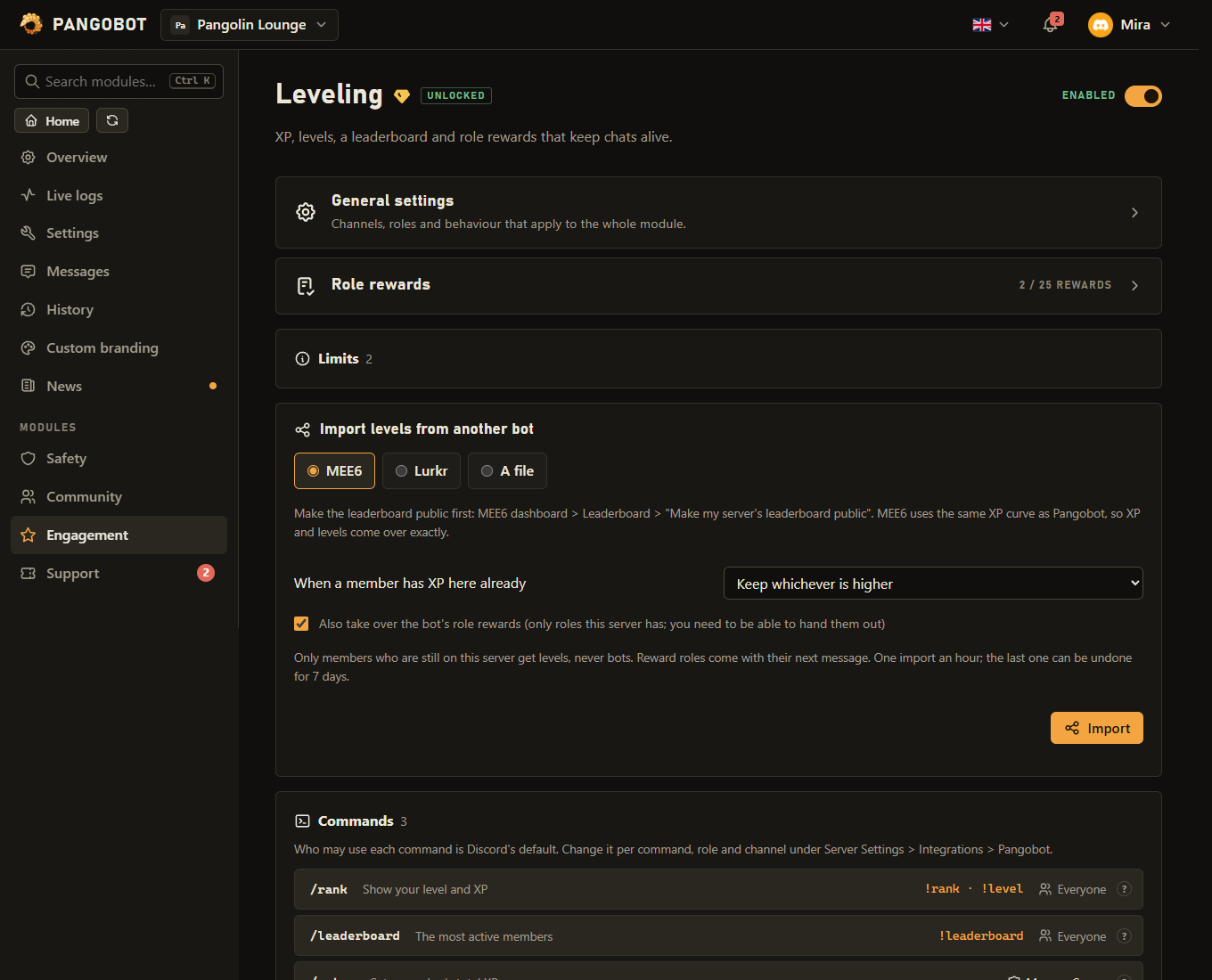
On the Leveling page, Import levels from another bot takes your members' levels over, so nobody starts from zero when you switch.
- MEE6 - from its public leaderboard of your server (make it public first in MEE6's dashboard). MEE6 uses the same XP curve as Pangobot, so XP and levels come over exactly. Its role rewards can be taken over too.
- Lurkr - from its public leaderboard (make it public in Lurkr first). Lurkr counts XP differently, so each member gets the XP their Lurkr level takes here. Its role rewards can be taken over too.
- A file - Lurkr's export, Polaris's "Download all data", a saved MEE6 leaderboard, or any CSV or JSON with a user ID and XP or a level per member. That covers bots without a public leaderboard, such as Arcane, Amari or Nadeko, if they give you their data.
- Choose whether a member who already has XP here keeps whichever is higher, or gets the imported value. Only members still on the server get levels, never bots, and reward roles come with their next message.
- Imported levels are not announced and pay no Economy coins. An import never lowers the highest level a member reached, so no level pays twice.
- One import an hour (after an undo you can import again straight away). The last import can be undone for 7 days: everybody gets back the XP they had before it (XP earned since then goes too; a level reached since then stays counted).
- To import, you need to be able to hand out every role XP brings with it here - the reward roles, and the Economy shop roles that the currency levels pay out can buy - just as for
/setxp.
Commands
<required> [optional] - "who may use it" is Discord's default; a server's admins can change it per command under Server Settings > Integrations.
/rank
Everyone/rank [user]Show your level and XP
usermember, optionalSomeone else
/leaderboard
Everyone/leaderboard [page]The most active members
pagewhole number, optionalPage
/setxp
Manage Server/setxp <user> <xp>Set a member's total XP
usermemberMemberxpwhole numberTotal XP
Settings
Everything you can set for this module in the dashboard, in the order the page shows it.
One cooldown for the whole server: messages in between earn nothing, in any channel or thread.
Only with “Level-up announcement”: “In a fixed channel”.
Placeholders: {level} {user} {user.name} {user.id} {server} {membercount} {channel} {channel.name} {message.link} Not with “Level-up announcement”: “Off”.
The announcement shows which message it belongs to. Only with “Level-up announcement”: “In the channel they are chatting in”.
Their threads earn no XP either, and a category covers every channel in it.
Off: a new reward replaces the earlier ones, and an earlier reward role is taken away even if the member got it another way (by hand, a role menu).
Limits
- Role rewards: up to 25
- /setxp sets up to 100,000,000 XP.
Good to know
- Channels (a bot or spam channel), whole categories and roles can be excluded from earning XP. Threads count as their channel: a thread opened in an excluded channel earns nothing either.
- The cooldown is one for the whole server: writing in another channel or a thread does not earn XP sooner. A changed cooldown counts at once.
- With Keep earlier reward roles off, a member keeps the rewards of the highest level they reached and loses the earlier ones - also when they got an earlier one another way. A reward whose role was deleted or has staff permissions is skipped: the one before it stays, and a deleted one is cleared the next time the page is saved. Verification's verified and unverified roles are never given or taken as a reward.
/setxpcorrects a member's total. It needs Manage Server in that channel - handing the command to a role in Integrations is not enough. When there are reward roles it also needs being able to hand out every one of them (Manage Roles and a role above it; the server owner always may), and raising a total while levels pay Economy coins needs the same for every role sold in the shop. A higher total gives the reward roles at once, a lower total takes back the reward roles of the levels above it, and/setxpwith 0 resets the member (they are gone from the leaderboard and/rank). Totals set with/setxpare not announced and pay no coins. Every change is written to the member log of Logging and to Live Logs, with who made it and the total before.- Levels can pay out server currency: see Economy. A message that jumps several levels at once pays for every one of them, and each level pays only once: if
/setxplowers someone's XP and they chat their way back up, the reward roles and the announcement come back, but not the coins for levels already paid. - The announcement channel has to be one you may write in yourself, because Pangobot posts your level-up text there. The same goes for changing that text later, or for sending the announcements back to a channel someone else picked; a link in the text also needs Embed Links there for you. Pangobot has to be able to post there too (View Channel and Send Messages), or the channel is refused when you save. "In a fixed channel" needs a channel before the settings can be saved.
- A level-up Pangobot cannot post, or a reward role it cannot give (above its role, a staff role, a deleted role, no Manage Roles), shows under Recent problems on the dashboard.
- The level-up message pings only the member who levelled up:
@everyone, roles or other members written in it stay silent. - In the channel they are chatting in, the announcement is a reply to the message that reached the level (switch: Reply to the message that reached the level). Placeholders:
{level}and the member's, the server's and the channel's, such as{user.name},{channel.name}or{message.link}. /rankand/leaderboardanswer privately in a channel where the member may not write.- Reward roles above you: if a reward role is above your highest role, you cannot change settings that would make it come sooner or to more members (more XP, a lower level, switching on Keep earlier reward roles, removing or raising a higher reward that replaces it), or switch Leveling on again. While levels pay Economy coins, the same goes for every role sold in the shop. The server owner, or someone above that role, can.
- The bot's role must be above every role it should give or take, and it needs Manage Roles.
What the bot needs
- Manage Roles for level rewards (Pangobot's role above them); View Channel and Send Messages for level-up messages, and Read Message History to post them as a reply to the message that reached the level.