





User Reports Free
Members report users or messages straight to your moderators.
Members report a user with /report or a message with a right-click. The report lands in a channel only your moderators see - Pangobot refuses a reports channel everybody can read, because the card names who sent the report.
Setting it up
- Set the reports channel (staff only) and, if you like, a role to ping.
- Optional: roles that cannot send reports.
- User Reports cannot be switched on without a reports channel.
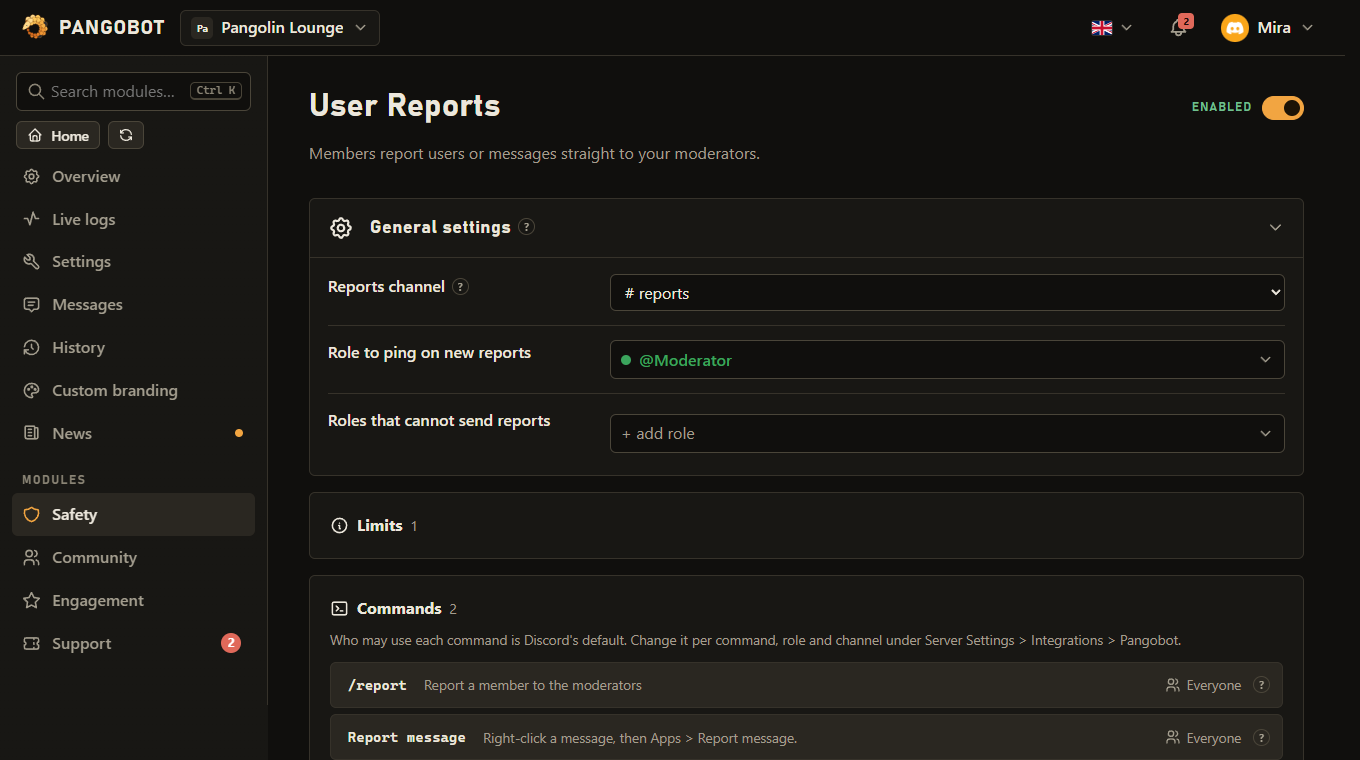
Commands
<required> [optional] - "who may use it" is Discord's default; a server's admins can change it per command under Server Settings > Integrations.
/report
Everyone/report <user> <reason>Report a member to the moderators
usermemberWho are you reporting?reasontextWhat happened?
Report message EveryoneA right-click command: right-click (or long-press) a message, then Apps > Report message.
Settings
Everything you can set for this module in the dashboard, in the order the page shows it.
Only your moderators may see it: a report names who sent it. Pangobot refuses a channel everybody can read.
Pinged at most once every 5 minutes. Pick a role only your staff have.
Members with one of these roles cannot use /report or Report message - staff included.
Limits
- A member can send 3 reports in any 10 minutes.
- A server receives at most 20 new report cards in any 10 minutes. Past that, reports from members who joined at least 7 days ago still get a card of their own, and all others are collected on one overflow card.
- Further reports about a member or message that already has an open card are added to that card.
- The ping role is pinged at most once every 5 minutes.
Good to know
- The person who reports gets a private confirmation. The card in the reports channel names them, so keep that channel staff-only.
- A reported message is quoted with a link to it and the channel it was in, so it can still be judged if it is deleted later: its text, a forwarded message, embeds, file names, stickers and polls. Pictures and files themselves stay on Discord and are gone once the message is deleted.
- Members cannot report themselves or bots. A message a webhook posted can be reported (with no Ban button). A post of an app a member installed for themselves is reported as that member.
- A member can send 3 reports in any 10 minutes. Further reports about a member or message that already has an open card are added to that card ("Also reported by") instead of making a new one. A reason too long for the card, or a reporter past the 8 named on it, comes as a reply to the card with the whole reason. Reporting the same member or message again with new details adds them to your report on the card - without a ping, and without counting against your 3 reports. The ping role is pinged at most once every 5 minutes - a further report pings again once those 5 minutes are over.
- A server gets at most 20 new cards in any 10 minutes, so a crowd of alts cannot bury the channel. No report is turned away past that: members who joined at least 7 days ago still get a card of their own, and the reports of newer members are collected on one overflow card, one line each, without buttons or a ping.
- The card shows whether the member has left, is banned already, is timed out or has staff permissions. A moderator a report is about cannot resolve, dismiss or ban from it - another moderator has to (the server owner can).
- Under every report: Resolved, Dismiss and Ban. Resolved means you acted, Dismiss means nothing needed doing - both close the card and say who. Ban opens a small dialog for the reason and how many days of their messages to delete, and then bans through Moderation - with the same rules as
/ban(the role ladder, immune roles, the DM, the case, your mod log). Resolved and Dismiss need Moderate Members (Discord calls it Timeout Members); **Ban needs *Ban Members*** (Moderate Members is not needed for it). A report about a webhook has no Ban button: there is no account to ban. - The Ban button needs Moderation switched on: Moderation does the ban. While Moderation is off, new cards come without a Ban button, and the one on an older card says to ban in Discord itself.
- The first moderator to act takes the buttons away, so two people cannot ban the same person twice.
- While a moderator is filling in the Ban dialog, the card is theirs: every button on it greys out for everybody else, and one more button says who is handling it. If they close the dialog without sending it, the buttons come back by themselves after three minutes (Discord does not tell Pangobot when a dialog is closed). A ban that Discord refuses gives the buttons back at once.
- If the reports channel is deleted, Pangobot cannot post there, or everybody can read it, no card is posted: the member is told the report could not be delivered, and the problem shows under Recent problems.
- A reported message is only quoted if the manager who picked the reports channel can see the channel it was posted in; otherwise the card says why and keeps the link.
What the bot needs
- View Channel, Send Messages and Embed Links in the report channel (checked when you save), Ban Members for the Ban button on a report, Mention Everyone to ping a role that is not mentionable.