





Forms & Applications Premium · €7.99
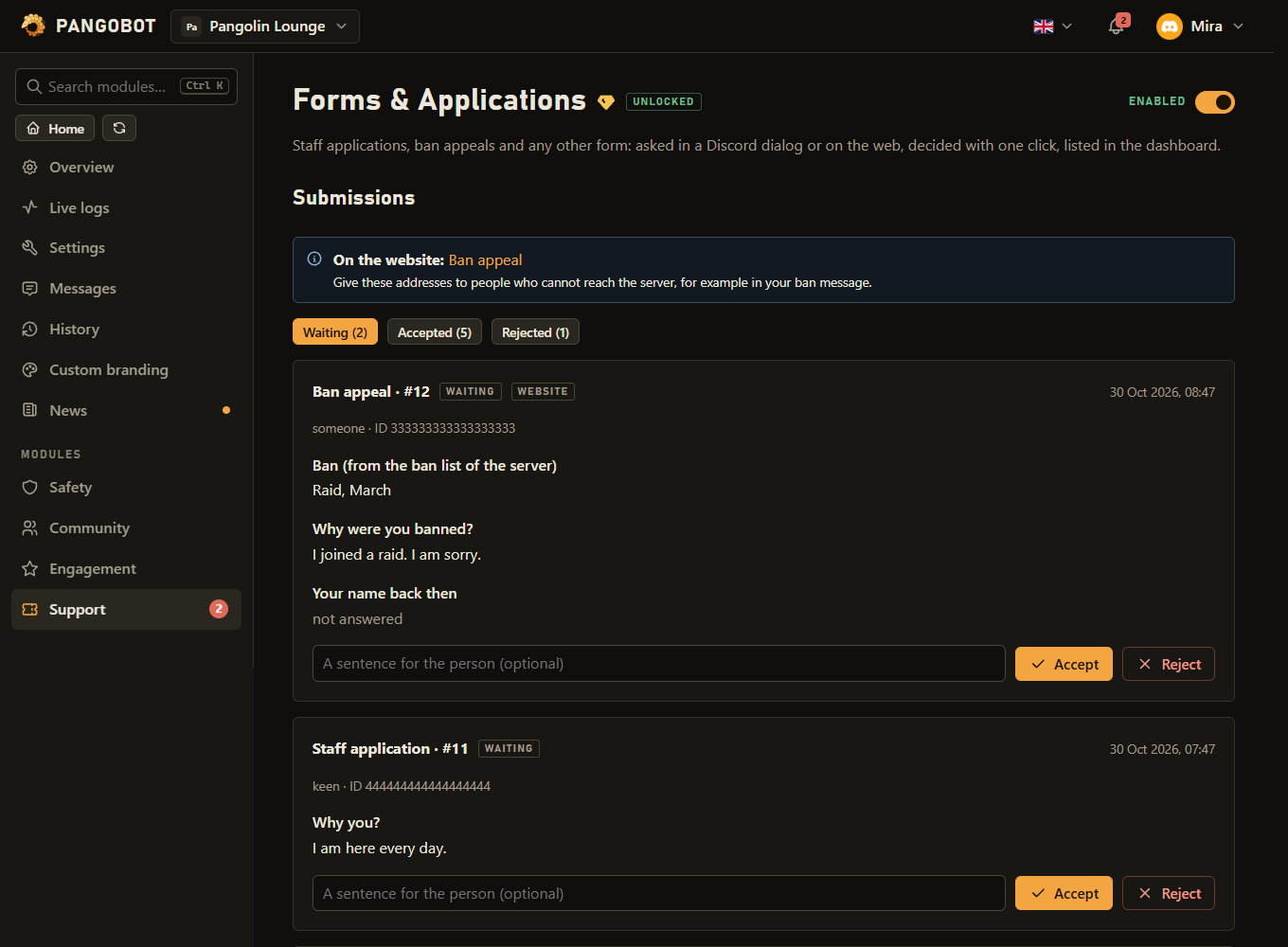
Staff applications, ban appeals and any other form: asked in a Discord dialog or on the web, decided with one click, listed in the dashboard.
Staff applications, ban appeals, event sign-ups: up to five questions, asked in a Discord dialog or on a web page. What comes in is posted for your staff, listed in the dashboard, and decided with one click - with an optional role for the accepted and a DM with the decision.
Setting it up
- Add a form: name, questions (each can be required or optional, short or long), and the channel your staff reads.
- Write the panel with its button, Save, then press Post / update.
- Optional: a role that may accept and reject besides members with Manage Server - on the cards in Discord. In the dashboard, members whose role was given Forms under Settings > Dashboard access can decide too (view and change); view only already shows every answer and an appeal's ban reason.
Settings
Everything you can set for this module in the dashboard, in the order the page shows it.
On the cards in Discord. In the dashboard, deciding needs Manage Server or a role given Forms under Settings > Dashboard access.
Save first, then press "Post / update" to publish the panel with the button.
Discord's dialog shows at most five questions of 45 characters; an answer may be up to 1,000 characters long.
Each submission is posted here as a card with Accept and Reject - only your staff should see it: a card names the person and shows their answers. Empty: submissions are only listed in the dashboard and nobody is pinged.
Your staff get a Discord notification for a new submission, at most once every 5 minutes per form. Only when “Channel for new submissions (your staff decide them there)” is set.
Accept and Reject open a dialog for a reason first. It goes on the card and into the message to the person, and can be left empty.
The address is shown under "Submissions" above once it is saved. Whoever opens it has to log in with Discord. When “This form is a ban appeal” is off.
Switches the website form on, shows the staff what the ban list says, and lets the person see the decision on the form's page.
Pangobot needs the Ban Members permission to look. Without it everybody can send the form. Only when “This form is a ban appeal” is on.
Accepting then needs the Ban Members permission - the reviewer role alone is not enough. Only when “This form is a ban appeal” is on.
Only when “This form is a ban appeal” is on.
Only when “This form is a ban appeal” is on.
Limits
- Forms: up to 10
- Per form - Questions: up to 5
- An answer can be up to 1,000 characters long.
- A form pings its ping role at most once every 5 minutes.
Good to know
- Get notified: set Ping when a submission comes in on a form, and your staff get a Discord notification for every new submission - at most one ping every 5 minutes per form, every submission still arrives as a card. Discord's own Apply to join requests are not visible to bots, so Pangobot cannot notify you about those: to be pinged about new members, let them apply with a form here and give them their role with Role given when accepted.
- Ban appeals: mark a form as a ban appeal and it gets a web address, because somebody who is banned cannot press a button in the server. The person logs in with Discord there.
- An appeal can be limited to people who really are banned, shows your staff what the ban list says, and accepting can lift the ban and show an invite link. With Only people who are banned can send it, a panel posted in a channel does not let members appeal either. The web page can take up to a minute to notice a new ban or unban; handing it in always checks the ban list afresh.
- Accepting an appeal that lifts a ban needs Ban Members - the reviewer role alone is not enough, and neither is Manage Server in the dashboard.
- Every form has its own Channel for new submissions, so a ban appeal does not have to land where the staff applications do. Each one arrives there as a card with Accept and Reject on it - and where accepting lifts the ban, the button says Accept & unban, so nobody has to remember what it does.
- Where a form asks for a reason, pressing Accept or Reject opens a small dialog - and while it is being filled in, the card greys out for the other reviewers and says who is deciding it. Closed without sending, it comes back after three minutes. A decision that cannot work (your own submission, a ban you may not lift) is refused before the dialog opens, so the card is not held for nothing.
- Switch on Ask for a reason when deciding in Discord and those buttons open a small dialog first. It is never required, and what is written there goes onto the card, into the message to the person, and - when accepting lifts a ban - into Discord’s own audit log next to the unban, so the server log says why somebody was let back in. A reason is written by Pangobot in the staff channel, so only somebody who may write there themselves can give one; without one the decision always goes through.
- The staff channel can only be a channel you may write in yourself and Pangobot can post in - Pangobot posts what members write there. It must be private: a card names the person and shows their answers, an appeal's card the ban reason too. A channel @everyone can read - or a role Pangobot hands to anybody, from a role menu or join roles - is refused; one that becomes public later gets no cards: the submissions are listed here, and Recent problems says why. A deleted staff channel is said there too.
- A wave of website submissions (alt accounts, a raid) cannot bury the staff channel: at most 20 new cards per server in 10 minutes from the web form. The rest are stored and listed here as usual, without a card. Submissions sent in Discord always get a card.
- Answers are shown as plain text: no headings, mention pills, spoilers or links hidden behind text -
[text](address)appears with its address, a plain link stays clickable, and nobody is pinged, whatever an answer says. A card also shows how old the person's account is. Very long answers are shortened there (one Discord message holds 6,000 characters); the dashboard shows every word. - Nobody accepts their own submission - only the server owner can; rejecting your own stays possible. @everyone cannot be the reviewer role, nor can a role Pangobot hands to anybody - and Pangobot never hands out the reviewer role itself. Somebody who is timed out cannot accept or reject - neither with the buttons in Discord nor in the dashboard - until the timeout is over.
- If the role given on acceptance has staff permissions (Ban, Kick, Timeout, Manage ...), only somebody who could give that role by hand - with Manage Roles and a higher role - can accept; rejecting stays open to every reviewer. If the role cannot be given (it is above Pangobot's role, was deleted, the person has left, or Discord did not answer), whoever accepted is told and it shows under Recent problems - give it by hand then.
- One submission per person and form at a time - also when somebody clicks twice, opens the page in two tabs or sends the dialog twice. The same person can be made to wait a number of hours before sending a form again - counted from handing in, not from the decision. Decided submissions are deleted after 180 days, ones nobody decides after a year - so a longer waiting time ends with them, and Appeals per person (counted per form) counts only the appeals Pangobot still keeps.
- A ban lifted outside the appeal (by hand, by another bot, a temporary ban running out) closes the person's waiting appeal, so an old card cannot lift a later ban - and they can appeal that one. The invite link is only given once the person is no longer banned.
- Somebody who opened the dialog or the web page before you changed the questions is asked to open it again, so no answer lands under the wrong question.
- Switched off, Forms takes no new submissions; waiting ones can still be decided, on their cards and here. An appellant can still see their decision on the web page.
- With your own bot, panels and review cards posted before a switch keep working, and Post / update replaces a panel the other bot posted.
- Renaming a form keeps its submissions, its waiting time and its count of appeals. Deleting a form leaves its waiting submissions in the list, marked as such - they can still be decided, but accepting one lifts no ban and gives no role, and whoever accepts is told so. Its web address changes with the name, so give out the new one after a rename.
- A form that is not open on the website can only be handed in by members who can see its posted panel.
- A note on a decision is shown on the submission's card in the review channel, so only somebody who can see and write in that channel can add one - anyone else can still decide, without a note. A note is shown as plain text on one line, on the card and in the direct message: no links, no headings. Whoever decides is told when the person could not get the direct message (DMs closed).
- Post / update first checks Pangobot's permissions in the panel channel. Moved a form to another channel? Press it again: the old panel then says it is out of date instead of opening the form. A submission whose staff channel Pangobot cannot post in is still stored and listed here, and the problem list says why.
- A number on the module in the dashboard tells your staff that something is waiting. Looking at the submissions is not written to the dashboard's change log; deciding is.
What the bot needs
- Ban Members for appeals (to check and to lift bans), Manage Roles for the role given on acceptance; Send Messages and Embed Links in the staff channel and where the panel is; Mention Everyone to ping a role that is not mentionable.