





General settings Free
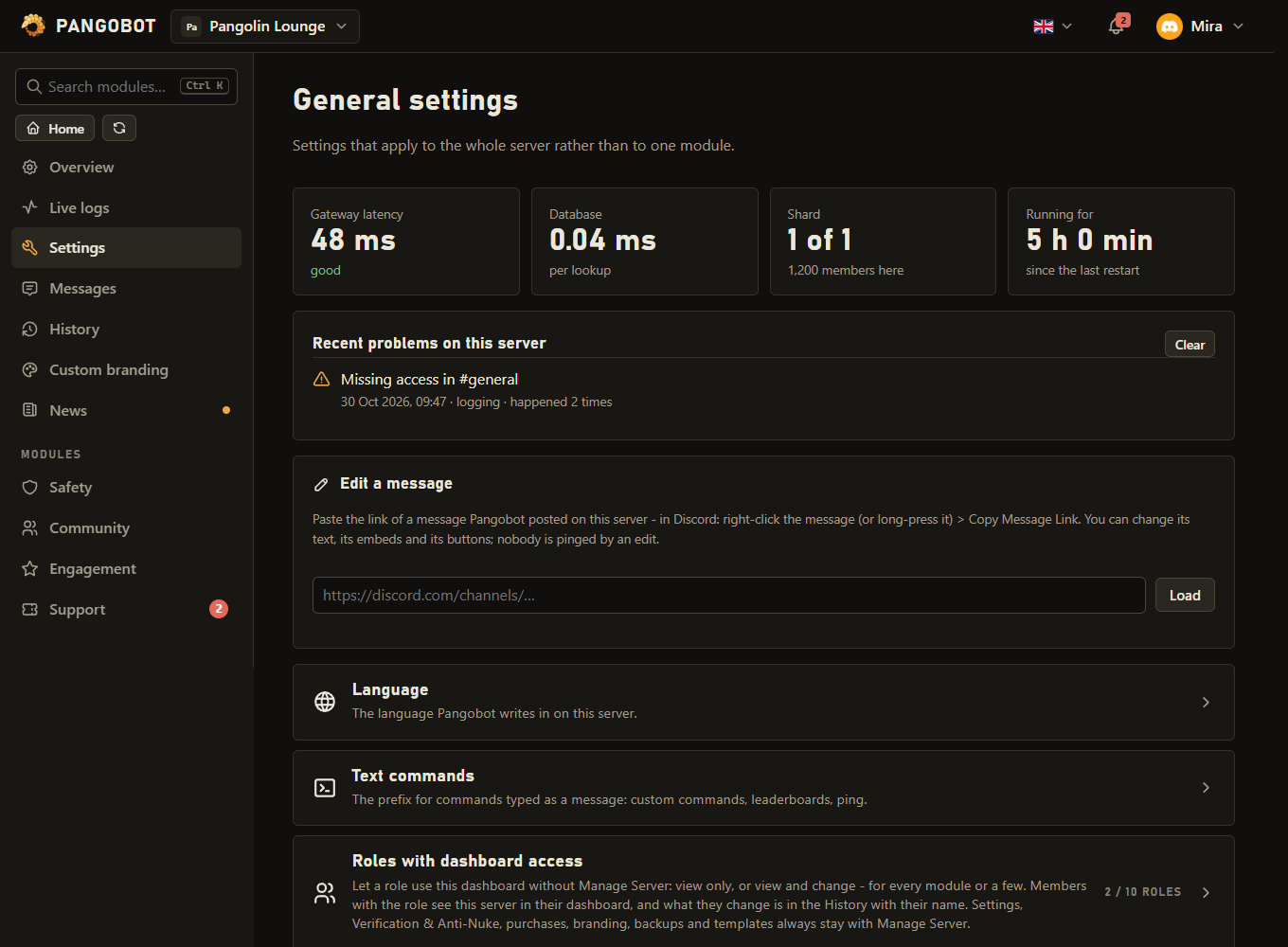
Settings that apply to the whole server rather than to one module.
Settings that apply to the whole server, and the small commands that are always there. It is the Settings entry in the dashboard's side bar and cannot be switched off.
Setting it up
- Edit a message (at the bottom of the page): in Discord, right-click a message Pangobot posted (or long-press it on a phone) > Copy Message Link, paste the link and press Load.
- The message opens as a form: its text, every embed in the embed builder with its live preview, and its buttons. Change what you like and press Save the message - the same message is edited in Discord.
Commands
<required> [optional] - "who may use it" is Discord's default; a server's admins can change it per command under Server Settings > Integrations.
/help
Everyone/helpWhat Pangobot can do and where to configure it
/ping
Everyone/pingPangobot's latency on this server
/modules
Everyone/modulesShow which Pangobot modules are active on this server
/redeem
Manage Server/redeem <key>Permanently unlock a premium module on this server with a module key
keytextPANGO-XXXXX-XXXXX-XXXXX-XXXXX-XXXXX
/userinfo
Everyone/userinfo [user]Information about a member
usermember, optionalWho? (defaults to you)
/serverinfo
Everyone/serverinfoInformation about this server
/avatar
Everyone/avatar [user]Show someone's avatar
usermember, optionalWho? (defaults to you)
Text commands
Typed as a normal message, after the server's prefix (! unless changed under Settings).
| Command | What it does |
|---|---|
!ping | The bot's latency, as a text command |
!help | Where to find the commands and the dashboard |
Settings
Everything you can set for this module in the dashboard, in the order the page shows it.
Language
The language Pangobot writes in on this server.
Posts and public replies use this language; private replies use the member's own Discord language. Texts you changed stay as you wrote them.
Text commands
The prefix for commands typed as a message: custom commands, leaderboards, ping.
Custom Commands answer to it (!rules), and so do !ping, !help, the game channels' !lb, !restart and !hint, and with Prefix commands on the typed commands. The command follows it without a space. Avoid / and characters that start Discord formatting (> # - * _ ~ | `). If another bot already uses !, pick something else, such as ? or p!.
Lets members type most slash commands as a message too: !ban, !mute, !purge, !rank, !remind, !afk and more (full list in the docs). Who may use them follows your slash command rules (Server Settings > Integrations).
Let a role use this dashboard without Manage Server: view only, or view and change - for every module or a few. Settings, Verification & Anti-Nuke, purchases, branding, backups and templates always stay with Manage Server. Never a role members can take themselves (a role menu, join roles, a level reward, the shop).
Web leaderboard
A public page with the top members of Leveling, Economy and Invites - only for the modules this server uses.
Anybody with the link sees the names and pictures of the top 100 members. Search engines are asked not to list it. Members can hide themselves on the page (they log in with Discord for that).
When something goes wrong
How much Pangobot says in Discord when a command fails.
Adds Discord's own error text and code to the failure message, for example "Missing Permissions (50013)". Only the person who ran the command sees it. Handy while setting the server up.
Limits
- Roles with dashboard access: up to 10
- Commands: at most 10 per member in 10 seconds, across all of Pangobot.
Good to know
- Edit a message works for any message Pangobot itself posted on this server - announcements, a role menu, a panel - in a channel where you may write yourself and Pangobot can still read (View Channel and Read Message History). Log lines (they come through a webhook) and messages of other bots or people cannot be edited.
- Threads follow Discord's rules: a message in a private thread can only be loaded if you are a member of that thread or have Manage Threads, and one in a locked thread can only be saved with Manage Threads. A message in an archived thread cannot be loaded: open the thread again first (unarchive it, or send a message in it), then press Load.
- Buttons that do something (take a role, open a ticket, verify) keep what they do: you can change their text, emoji and colour. Link buttons can be changed, added and removed. Dropdown menus and attached files stay as they are.
- An edit never pings anybody, whatever the text says. Embeds that show when they were posted keep that time.
- A message that belongs to a module (a role menu, a verification panel, an embed post) says so when it is loaded: when that module posts or updates it again, what is saved in the module comes back - so a lasting change belongs there.
- The prefix is for text commands only: Custom Commands,
!ping,!help, the game channels'!lb,!restartand!hint, and with Prefix commands on the typed commands. Slash commands never change. The command follows the prefix without a space (!help, not! help), so a quote, a list or a heading that starts with the prefix character is never taken for a command. Avoid/and characters that start Discord formatting (>#-*_~|), and pick another prefix if another bot already uses!. Text commands answer people only: not bots, webhooks or Discord's own messages. - /avatar, /userinfo and /serverinfo are shown to everybody only where the member may write and post links themselves, and not more often than the channel's slowmode allows, counted from their own last message there too. Anywhere else only the member sees the answer: a read-only channel such as #announcements, a thread a moderator has locked, or while they are timed out. Typed as a message there (
!avatar), they point to the slash command instead. Moderators (Manage Messages, Manage Channels or Bypass Slowmode) are not slowed down. /userinfo shows that a member is timed out only to people who may time members out themselves (Timeout Members), and then only to them. - While you are timed out on a server, its dashboard stays closed to you until the timeout ends.
- Show the technical reason adds Discord's own error text (such as "Missing Permissions (50013)") to a failure message. Only the person who ran the command sees it - so it is left out after a command typed as a message, whose answer the whole channel sees.
/redeemunlocks a premium module with a module key: see Free and premium.