



Verification & Anti-Nuke Free
A verification gate for newcomers, automatic lockdown during raids, and a guard against accounts that start deleting your server.
Three protections in one module: a verification gate for newcomers - with an image CAPTCHA, and either for everybody or only for accounts that look suspicious - an automatic lockdown when a raid starts, and anti-nuke - a guard against an account (often a compromised admin or a rogue bot) that suddenly starts deleting channels, roles or members.
Setting it up
- Verification: create a "verified" role and make your channels visible to that role only - or create a role for those who still have to verify and hide your channels from it. Leave one channel visible for the panel. Pick what a newcomer has to do (Type the code from a picture is the strongest), set the roles, save, then press Post / update the verification panel.
- Only suspicious accounts: switch on Only suspicious accounts have to verify and say what counts as suspicious: an account younger than a number of days, no profile picture, words in the name - and three more that cost nothing to check, because Discord sends them with the member: has not completed your onboarding (only worth using once Server Settings > Onboarding is really set up, or it counts against everybody), has been on this server before, and the name or profile text has been quarantined by Discord's own AutoMod. Everybody else gets in at once - with the verified role right away, if you use one. With While a lockdown runs, everyone has to verify, a raid makes it everybody again until the lockdown ends.
- Lockdown: set how many joins within how many seconds count as a raid, and what closing the doors means: pausing invites, raising Discord's verification level.
- Anti-nuke: choose which actions count, how many within how many seconds, and what happens then. Add the accounts you fully trust.
If a staff account is hijacked
A hijacked admin or moderator account - or a bot that turns rogue - usually does its damage within a minute: channels and roles deleted, members banned, new webhooks spamming. Anti-nuke watches Discord's audit log for exactly that. As soon as one account goes over the limit you set, this happens:
- The account is stopped, the way you chose under Then: all its roles are taken away (a bot is kicked), it is banned, or you only get an alert.
- What it handed out is taken back (not with Only alert): dangerous permissions it gave a role, admin roles it gave to other accounts - so its second accounts cannot carry on - and the webhooks it created. Dangerous permissions given to @everyone are taken back at once, even below the limit.
- Your log channel gets an alert with what the account did and what was done about it.
- Deleted channels can be brought back with one button - see below.
What comes back, and what does not
| What the account did | After anti-nuke |
|---|---|
| Deleted channels and categories | Restored with the Restore deleted channels button, for seven days: name, category and place, permissions, topic, slowmode and the other channel settings. Your Pangobot settings that pointed to them are moved to the new channels. |
| Messages in those channels | Gone for good: Discord deletes them with the channel. |
| Dangerous permissions given to roles, admin roles given to members | Taken back automatically. |
| Webhooks it created | Deleted automatically. |
| Deleted roles | Not restored: make them again by hand. The server log of Logging shows which ones went. |
| Bans, kicks and prunes | Not undone automatically: lift the bans with /unban or in Server Settings > Bans; members who were kicked or pruned can come back with an invite. |
- Deleted channels can be restored. When anti-nuke stops an account that deleted channels, a Restore deleted channels button appears in the log channel. It makes them again - categories first, each channel in its category and place, with its permissions, topic and slowmode - moves channels that lost their category back into it, and points your settings (log channels, a welcome channel and the like) to the new channels. The messages of a deleted channel cannot come back: Discord deletes them with it. The button stays usable for seven days. **Restoring takes Manage Channels and Manage Roles,** with the button and in the dashboard alike, because the channels come back with their permissions.
- If the log channel was deleted too, the server owner gets a direct message, and the same restore is in the dashboard: Verification & Anti-Nuke > Restore deleted channels. The dashboard names only the channels you can see; the others are counted.
- A private channel is never made again as a public one: if Pangobot may not set its permissions, the channel is left out and named in the result.
Be ready before it happens
- Anti-nuke can only stop accounts whose highest role is below the bot's role. Put the bot's role high.
- Leave Count deleted channels on: Pangobot can only restore a channel whose settings it noted at the moment it was deleted.
- Set a log channel that only staff can see, so the alert and the restore button reach you.
- The server owner's own account and the trusted accounts are never stopped: keep that list short, and protect the owner account with two-factor authentication.
- A hijacked admin cannot switch anti-nuke off first: switching it off or loosening it is the server owner's alone.
Settings
Everything you can set for this module in the dashboard, in the order the page shows it.
Verifications, lockdowns and anti-nuke alerts are posted here.
Only when “Log channel” is set.
Verification
Newcomers press a button in a channel only they can see. Set your channels up so that the rest of the server needs the "verified" role - or is hidden from the "unverified" one.
Everybody else gets in at once - with the verified role right away, if you use one.
0 = the age does not count Only when “Only suspicious accounts have to verify” is on.
Only when “Only suspicious accounts have to verify” is on.
Discord marks accounts it believes are spam bots. The strongest single sign there is - accounts bought or farmed months in advance often have a picture and an old creation date, but not a clean record. Only when “Only suspicious accounts have to verify” is on.
Only useful when this server actually uses Onboarding (Server Settings > Onboarding). Without it nobody ever completes it, so everybody would count as suspicious. Only when “Only suspicious accounts have to verify” is on.
Discord marks somebody who left and came back. Often harmless, and a sign worth having when people are getting around a kick. Only when “Only suspicious accounts have to verify” is on.
Discord itself has found the name or the "About me" of that account unacceptable and is holding it back. Only when “Only suspicious accounts have to verify” is on.
Look-alike letters, accents and spacing do not get around it. Only when “Only suspicious accounts have to verify” is on.
Needs the lockdown below. Only when “Only suspicious accounts have to verify” is on. Can be changed only when “Lockdown during a raid” is on.
Only when “Only suspicious accounts have to verify” is on.
Not with “What a newcomer has to do”: “Press the button”.
0 = never
Lockdown during a raid
Closes the doors for a while when many accounts join at once, and opens them again by itself. Needs the Manage Server permission.
Anti-nuke
Admins can switch it on and make it stricter; only the server owner can switch it off or loosen it. Watches the audit log - what a moderator does through Pangobot counts for that moderator. The server owner, Pangobot itself and the trusted accounts below are never touched - put other moderation bots there, they ban and kick on behalf of your moderators. Needs View Audit Log, and a role above the accounts it should stop.
A prune counts as many times as it removed members.
When the account is stopped, the webhooks it created are deleted as well.
A flood of new channels or roles. Building is what admins do, so a creation counts half: it takes twice the number above.
A role that gets (or is created with) Administrator, Manage Server / Roles / Channels / Webhooks, Ban, Kick, Timeout or Mention @everyone - and an admin role given to a member. When the account is stopped, these are taken back. If @everyone gets one of them, that is undone at once.
By user ID - or paste a mention.
Limits
- Suspicious: the name contains: up to 100
- Trusted accounts: up to 50
- "Another picture" for the image CAPTCHA: 5 per 5 minutes.
Good to know
- The server owner, Pangobot itself and the trusted accounts are never touched by anti-nuke. Put other moderation bots on the trusted list - they ban and kick on behalf of your moderators.
- Admins can switch anti-nuke on and make it stricter - a lower limit, a longer window, more that counts, a harder reaction, fewer trusted accounts. Switching it off or loosening it in any way is the server owner's alone, and so is switching this module off while anti-nuke is on: a hijacked admin account cannot make room for itself first. For the same reason, while anti-nuke is on only the owner can connect, replace or remove the server's own bot (Custom branding).
- What counts: deleted channels and roles, bans, kicks and prunes (a prune counts once per member it removed), created webhooks, a flood of new channels or roles (a creation counts half), and dangerous permissions handed out. Bans and kicks a moderator does through Pangobot count for that moderator.
- A lockdown opens again by itself after the time you set, and invites and the verification level come back - also when Pangobot was away from your server at that time: it ends as soon as Pangobot is back. End lockdown now keeps working when this module is locked (for example after a refund) or switched off for everyone by the Pangobot team.
- Post / update the verification panel first checks that Pangobot may post in the channel (View Channel, Send Messages, Embed Links, and Read Message History to update the panel) and says which permission is missing. A second click while the panel is being posted is refused. The panel's text and its button can only be changed by someone who may write in the panel's channel.
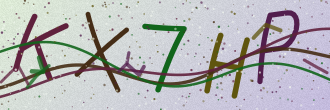
- The picture code is five letters and digits, capitals or not - letters that look alike (0 and O, 1 and I, 5 and S) are never used. Another picture gives a new one without costing an attempt (a few every couple of minutes).
- Someone who cannot read the picture (with a screen reader, for example) can be let in by a moderator: give them the verified role by hand. The symbol and button methods are the gentler choices.
- No CAPTCHA stops a script that was written for your server in particular. The picture stops what joins servers by the thousand - together with the lockdown and Join Guard it closes the usual ways in.
- The strongest sign of a suspicious account is Discord's own "likely spammer" flag - on by default. Accounts that are bought or farmed months in advance usually have a picture and an old creation date; the flag is what they cannot hide.
- A suspicious newcomer gets a short direct message that points to the panel. It does not say what made the account suspicious - that would tell a scammer what to change next time. Your log channel does say it.
- Newcomers who never verify can be kicked after a number of minutes; wrong answers are limited too, and remembered for an hour.
- A lockdown never switches on invites that were already paused before it began, and it leaves a verification level alone that somebody changed while it ran.
What the bot needs
- Manage Roles and Kick Members for verification (the kick after failed tries or when time runs out), and View Channel, Send Messages, Embed Links and Read Message History where its panel is. Manage Server for the lockdown. View Audit Log, Ban Members, Manage Roles and Manage Webhooks for anti-nuke (Kick Members to remove bots). Manage Channels and Manage Roles to restore deleted channels (and Administrator for channels whose permissions allow more than Pangobot may itself). Mention Everyone to ping an alert role that is not mentionable.